Sunday, 30 November 2014

Custom Star Rating Component Using Visualforce In Salesforce

Have you ever met with a requirement where you had to Rate list of records in salesforce and store the ratings related to Individual user and then do an average rating based on rating for all users for the records ?The records that I refer  to may be your custom objects ,or leads or may be your Accounts or opportunities .Providing ability to Rate records is one of the common requirements if you are building a site where you showcase your products .Salesforce knowledge article provides this facility but the solution we will do here will be rating custom object or standard object and we assume you don't use knowledge module for your purpose .

Our approach will be to use a simple plugin that I liked very much and special thanks to the actual author who has developed this plugin Kartik Visweswaran.I salute his work and my work is just integrating his work with salesforce Visualforce Page .

Lets get started with simple demo that he has hosted on his site ,the demo link is as below

http://plugins.krajee.com/star-rating/demo

Lets quickly grab his plugin from the github repo .

Assumptions for this work

I have created a Junction object between user and Account and have named it as Account Rating .The Account Rating object has a custom field created of number type Rating to store the rated no from visualforce interface

Visualforce Code 

We will import all the jquery,CSS,bootstrap plugins into the static resource and reference the same in the VF.The entire code is as shown below


The meat of the code above is how we have used script to call javascript remoting function to upsert the junction object

Apex Code


Let me take some time in explaining this on what we have been doing here,

The Input HTML-5 tag has a javascript that detects when the rating changes .Once the rating star is clicked we call js remoting to upsert user rating for the Account.The demo page appears as below link .Note I have kept code very simple .and may be once I have time i will enhance this to make it generalized for any object and fields.

http://webzone-developer-edition.ap1.force.com/webzone/RatingDemo
I have made a small unmanaged package in case you want to pull this and play in your org to see how this goes

Use this URL to install the package into any organization:
https://login.salesforce.com/packaging/installPackage.apexp?p0=04t90000000FNdn

Note: If you are installing into a sandbox organization you must replace the initial portion of the URL with http://test.salesforce.com

Also a small video I have attached to explain the functionality clearly .Also note from karthik demo you can add all style elements .Check his demo page for more styling .The attributes can be configurable as well


Enjoy coding .....

Sunday, 9 November 2014

Learn how to use Salesforce Communities Designer for Self Service Portal


Salesforce community portal have been in use for long time, but was limited in offering pleasant features and specially custom configuration. To introduce as new feature, lot of additional works needs to be done, both from development and design perspective, which include using HTML, CSS and Javascript on top of Visualforce.


Clearly powerful user-experience and clean user interface adds high user engagement. In person, we have spend weeks to leverage an impactful customer experience with Salesforce Communities


Salesforce introduced community designer and have fascinated me in person, I have been working on this platform for about three year, and I find this tool be very productive. I teamed up with +Harshit, and decided to write this blog post here explaining how to Salesforce Community Designer Tool released in Winter'15.


To explain a functionality, I am choosing a business scenario, covering business activity in an financial institution, and covering mundane activities like resolving credit-card/loans issues. My objective is to explain this all with no-code, and rather deal everything with 'Point and Click'.

Prerequisites

1) Lets set up a developer org . sign up for an org from developerforce.com


2) If you are not familiar with communities, we recommend reading this setup guide here .


3) Knowledge articles is the soul for this whole set up. Get some coffee and go to this setup video here


Having installed Prerequisites (Note : three of mentioned resources, are mandatory) , we will look up Salesforce Community Builder and Templates, to set up Self-Service Portal


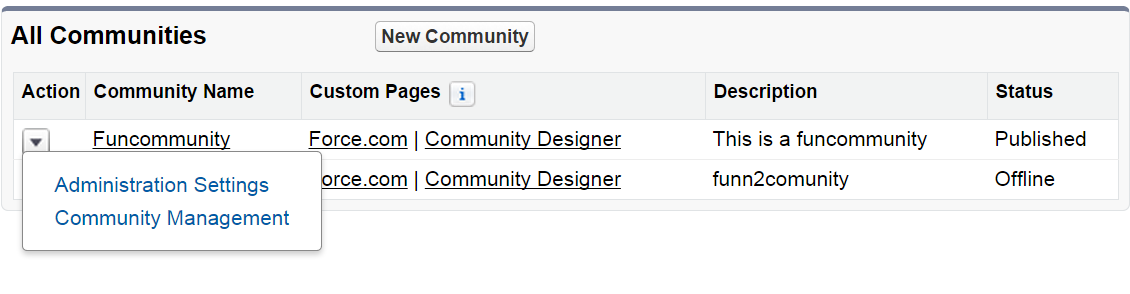
Navigate to Set up>Communities>All Communities


Note : As shown in picture above, two new additional setting are introduced as  ‘Administration Settings’ and ‘Community Management’


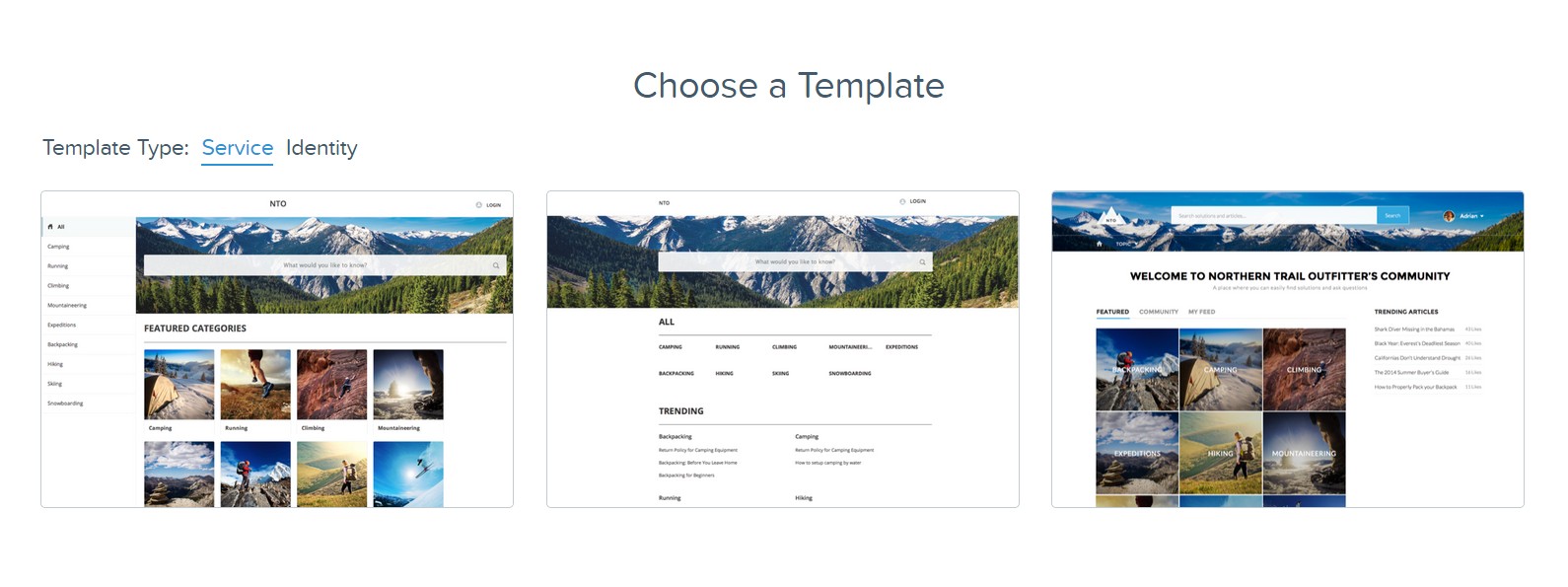
Salesforce Community Templates

Primarily, three important templates available to jump start, but I would like to share the amenities, each templates offer, and make choice easier for you.


1) Kokua - Uses data categories, case and Salesforce Knowledge.
2) Koa- Designed for Mobile, features include, articles search and case management.
3) Napili- Offer most features, with Q&A, Knowledge Articles and Case Support. Clearly, I’ll use this template moving forward


Pickup template of your choice, In here, I have created a community named ‘FunCommunity’ as you can see in drop-down,


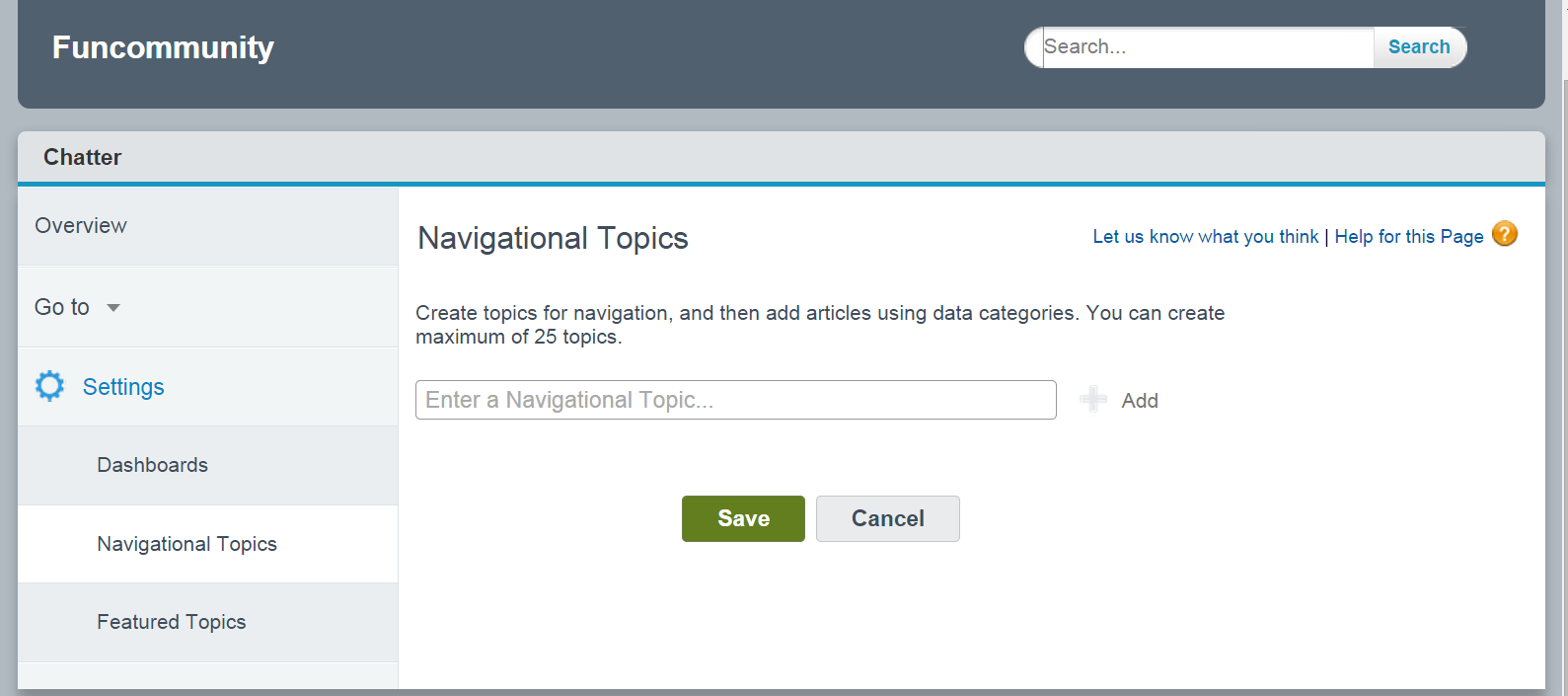
Setup Navigational Topics

Got to Community Setup shown as above and you will see salesforce settings screen similar to
one shown below


Bind Topics

Go to (Setup -> Topics -> Topics for Objects) to bind topics to every knowledge article. Clearly, this make it easier to locate or navigate in the community


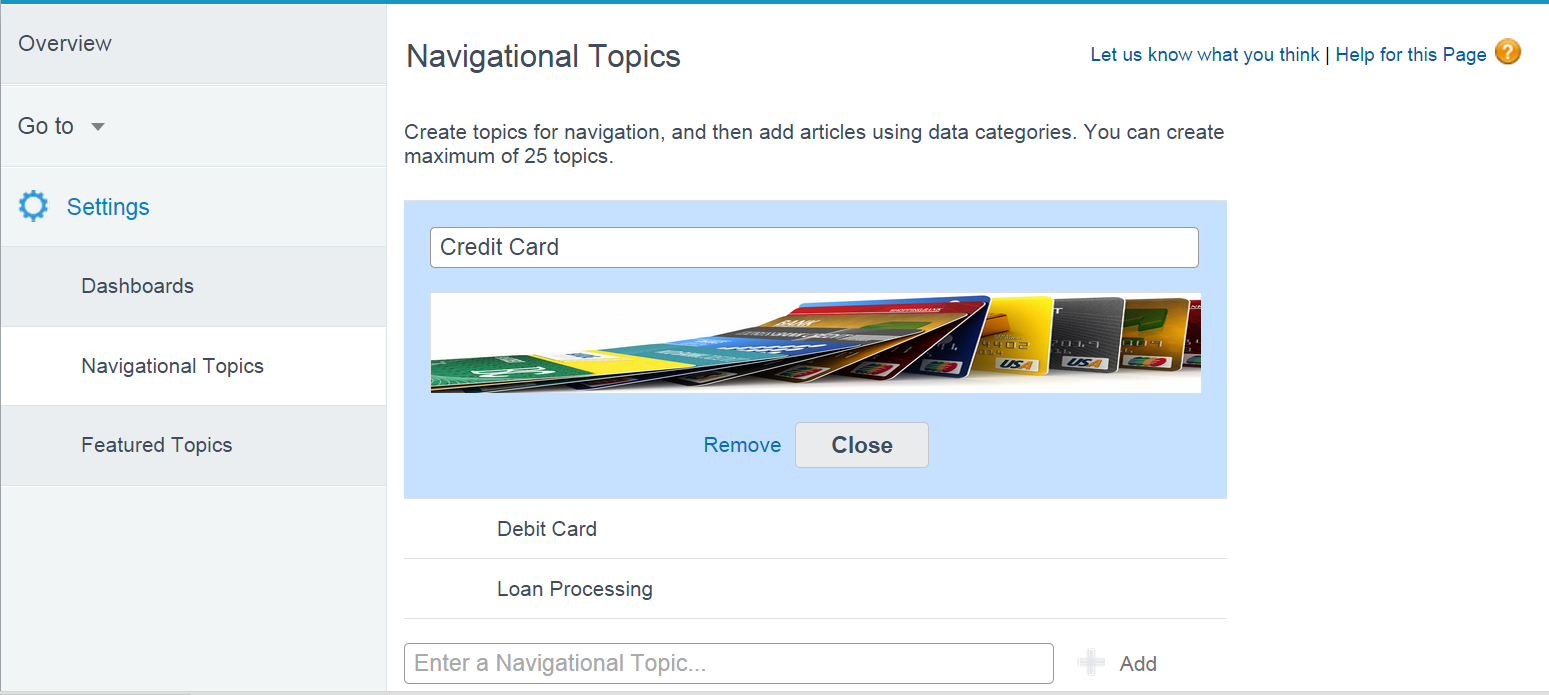
Screen shot below explains, how to add banner images for each topic. I have created three topics for here to demonstrate, Credit Card, Debit Card and Loan Processing


Assign Data Category


Locate arrow on top-right, to assign data-category for each topic, in the picture below    


Featured Topics

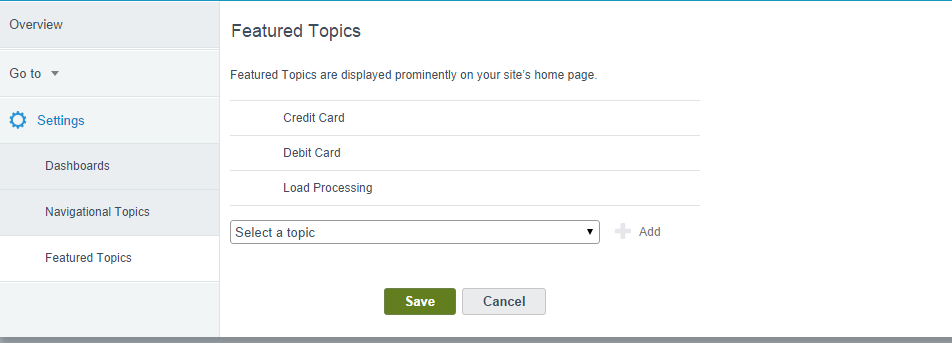
Every featured topics, pop as thumbnail on homepage, add feature topics here


Video Summary

With that said, you community portal has taken shape with pure configuration and 'no-code' involved. I am compiled these steps in a video and discussed some more feature(s). Feel free to provide us feedback and share your knowledge with us.


Tuesday, 14 October 2014

Journey from blogger To author

Sorry for not being so much active here but I have a strong reason that I am sure you will forgive me .I am excited to inform I was given an opportunity to author a book on explaining administration essentials of Salesforce.com CRM .I have completed the book and I am eager to get some feedback from readers .

It was not easy job working on this after office hours but this was true unique experience and challenge .

Who This Book Is For

This book is targeted at expert administrators or professionals who are new to Salesforce and want to learn the various features supported by the platform in a short space of time. The book can also be used by professionals preparing for Developer and Administrator certification exams from Salesforce.

What You Will Learn


  1. Understand how licensing, profiling, and security settings are set for users
  2. Perform data modeling and use Salesforce components such as workflows, approvals, validations, layouts, and record types to solve business problems
  3. Get to know the reporting basics and use Salesforce analytics to build reports and dashboards
  4. Troubleshoot common challenges that administrators face in real-time businesses
  5. Get to grips with the Sales Cloud and Service Cloud features provided by the platform
  6. Utilize tools such as the data loader to load data into Salesforce
  7. Load data using an external ID and understand the importance of Excel VLOOKUP
  8. Get familiar with the overall administrator responsibilities for real-time applications

salesforce is one of the leading platforms for developing cloud-based applications. Primarily, Salesforce is designed for managing the sales processes of an organization, but the platform can be leveraged to develop custom applications. It runs on the Force.com platform. With the advantage of having reduced development costs, we can deliver applications in a very short time span. With this book, administrators will learn to tackle a lot of things that pop up in their daily routine.

This book is a comprehensive guide that explains user management, profile management, and the basic building blocks of an application. The book proceeds by explaining the troubleshooting skills needed for an administrator. The best practices and disciplines of data loading are discussed in detail. The book concludes with an overview of sales and service cloud features so that the reader is ready for the advanced configurations of this module. By the end of the book, you will be a competent administrator who can manage and maintain the Salesforce data of your organization successfully.

To get a sample chapter you can visit below link


You can also purchase both ebook as well as printed version from amazon or packtpub.

Would love to get some feedback on how this book is and remember this is for people who have just started using salesforce CRM and are completely new 


Sunday, 7 September 2014

Invoking Apex Callouts through Visual Flows

Few weeks back I was attending a Webinar on Advanced Flow From SFDCBill(Product Manager Flows Salesforce.com) .I was quite surprised to discover flows are very powerful feature provided by the platform for the administrator to configure the business logic .

My friend Rakesh has been blogging lot of use cases of flows for Salesforce 1 and using chatter objects .You can refer his blog for more details on the work he has done .I have learned lot from those and I am thankful to him for sharing his experience with visual flows through his blog


http://rakeshistom.wordpress.com/category/workflow-rule/visual-workflow-flow/


One of the things that came was invoking callouts or webservices through flows and SFDCBill was able to communicate the design that one needs apex and process plugin for invoking callouts directly from the flow .I did a quick online search to see if this has been demonstrated  and was not able to get some good resource so i thought of sharing a sample tutorial on how to invoke callouts from flows directly.

The more information on the process plugin can be obtained from below URLs ,

https://www.salesforce.com/us/developer/docs/apexcode/Content/apex_process_plugin.htm
https://www.salesforce.com/us/developer/docs/apexcode/Content/apex_process_plugin_example_lead_convert.htm

The Process plugin is an apex Interface and that needs to be implemented in order to pass request into the apex class from the flow input or screen and the apex interface returns the response back to the flow.

Lets discuss how we can make a web service or apex callouts from flow directly .

1)Our first step will be to write the apex plugin class that makes a webservice callout to external website and process and makes the data ready for passing back to the flow.

For webservice part I have taken a sample REST service provided for free for learning purpose from the website http://api.wunderground.com/weather/api/

The web-service takes input of state and city of US and outputs current weather condition in the form of JSON objects .Note that you need to sign up and generate an API key for your use .

The input of state and city can be taken from flow screen and it can be passed directly as request parameter to the apex class .

Here is the complete apex class for the flow plugin


2)For JSON parsing ,I have used another class shown below ,which handles parsing of the data .This can be easily generated using https://json2apex.herokuapp.com/ by providing sample response JSON.

Lets dig into the creation of flows ,

Visual workflow basics can be studied from following resources 

http://help.salesforce.com/help/pdfs/en/salesforce_vpm_implementation_guide.pdf
http://www.salesforce.com/us/developer/docs/workbook_vf/workbook_vf.pdf

3)We will need below three components 

i))Input Screen to take data of city and state from User need as input for our webservice
ii)WeatherAppApex Plugin we have just developed using apex
iii)Output Screen to display the result


The input screen will have two fields to capture input 


The Apex Plugin will have a mapping for both input and output from result.The below screen shots show the input and output mappings .Note for output mapping for further usage of output  parameters flow variables are created


The output Screen is last piece to display the results .

Now lets see the outcome of this work in below video


I hope you enjoyed this tutorial and looking forward to your comments below .

Please note error handling in code and Test classes are left as it was just a POC code .Be careful to take care of all these when implementing for client code .

Happy Coding !!!

Sunday, 10 August 2014

Refreshing Parent Window of Inline Visualforce Page from Child Window Opened from Inline Visualforce Page

The problem statement is From Inline Visualforce We need to open a Child window and then from that child window we need to refresh the Parent window of the Child window or redirect Parent window of the child window .

Last night ,I was struggling on how to redirect the Parent Window from the child window that was opened from the Inline window 

I tried hard on how to solve this ,but finally last resort was to post the query on salesforce stackexchange .The below is the link for the same


The error was due to Javascript security of web browser .

I tried the below script on the child window

<script>

  function test(){
     alert('hello');
     window.opener.top.location.href='https://googleflowauth-dev- ed.my.salesforce.com/001900000096agv';
  }

   </script>

Unsafe JavaScript attempt to initiate navigation for frame with URL 'https://googleflowauth-dev-ed.my.salesforce.com/001900000096agv' from frame with URL 'https://googleflowauth-dev-ed--c.ap1.visual.force.com/apex/pagereal'. The frame attempting navigation is neither same-origin with the target, nor is it the target's parent or opener.

The browser security features don't allow navigation from child window directly since visualforce and standard detail page are in different domain.The above error is due to the same feature .

Stackexchange has really expert professionals and Eric suggested me the below solution.I am posting the same so that helps others


The Inline page on the parent window has the below code

<apex:page standardController="Account" extensions="Accountctrl">
<apex:form >
 <script>
  function openwindow(){
       window.open("/apex/pagereal", "myWindow", "width=200, height=100");
 }
  function navigate(){
  window.top.location.href='https://googleflowauth-dev-ed.my.salesforce.com/001900000096agv';//Parent function that redirects
  }
 </script>
<apex:pageBlock >
 <apex:pageBlockSection columns="1" id="Test" >
  <apex:inputcheckbox value="{!test.istest__c}" label="Same as Above">
    <apex:actionSupport event="onchange" rerender="Test" />
</apex:inputcheckbox>
<apex:outputPanel rendered="{!NOT(test.istest__c)}"> 
<apex:inputField value="{!test.Campaign__c}" />
<apex:inputField value="{!test.cust_vendor__c}" />
</apex:outputPanel>
   </apex:pageBlockSection> 
  </apex:pageBlock>

Note that navigate function we will call from the child window and that would navigate parent frame

<apex:page >
 <!-- Begin Default Content REMOVE THIS -->
 <h1>Congratulations</h1>
 This is your new Page

  <script>

 function test(){
     alert('hello');
     window.opener.navigate();//call the parent function from child window and that does the trick
 }

 </script>
  <apex:form >
 <!-- End Default Content REMOVE THIS -->
  <apex:commandButton onclick="test()" value="Test"/>
  </apex:form>
</apex:page>
The child window script will call the opener  window script and that in turn will redirect the parent frame .

Hope this trick will be useful .

Sunday, 20 July 2014

Won Summer Hackathon Bangalore Contest

So here is the good news .Last night we were declared winner of Summer Hackathon Challenge conducted in my city (Bangalore).To know more you can visit the link.First of all let me very clear that I am nothing without my team .It was complete Team work right from Idea to Implementation .


Let me take some time to Introduce you to my fellow colleagues who have worked and taught me so much and I am just a small part .

+MUKUL goel +rashmi t  

Mukul  you can contact him with email mukulgoelster@gmail.com  

Rashmi  you can contact her with email rash2521989@gmail.com


I have never been to Hackathon before and this was really something I thought i should give a try .Nervous I was but when we formed a Team and Started Building ,Confidence level Picked up.

Thanks to Salesforce and BeMyApp .They had organised the event very well .All that we needed to concentrate was to have a working demo of our application on final day of submission.

First Day -When so many Ideas emerge its important to be a good listener .Appreciating each others Idea In a Team certainly helps and its important to keep the team bonding.We stayed whole night in Mukul room and we had pretty much designed UI flows and we were clear on what needs to be done.Its important to have a rough Idea of how you want to shape your Idea and Design and then build .We had completed I would say 25% on day one and all set for second day.

Is sleep Essential?

Yes as humans its important to relax our minds and keep calm .All thanks to my friend mukul who allowed us to take nap for 4 to 5 hours to relax and rest in his personal room.Salesforce allowed to bring sleeping baggage and we could have slept in hall but never wanted to disturb other coders.

Second Day-I saw we were getting exhausted but we kept going .We kept coding and nearly we did our first git commit  in noon .We knew we are close and all we need to do is to keep focused and achieve as many functionality as we want .Our app build was almost there by 10PM on second day .We decided to take rest .

Thanks to mukul ,he did all data clean up and Data search and kept going till 4 AM(Almost third day morning).I was sleeping but mukul kept going

Third Day-It was the most critical day and we did not wanted to loose our focus and all hardwork we had done in these days .I took initiative to come early and do some git commits as I wanted my team to relax and come refreshed.We knew by after noon we need to complete all coding and do final push.

We knew we had shaped our app well ,even if you have small glitches its not worth to keep concentrating as you have small build time and judges know you are human.

So finally we practiced our presentation and we were all set to go to stage and communicate to judges effectively of what our vision and what we have done .

Experience has been amazing and remember attending these hacks broaden and sharpen your skills and give you an edge on where you stand on overall crowd .So you have nothing to loose .

Winning was not motive its to keep focused and do your best and rest may happen magically.


Our App video is here in the below link and we are so excited about this Sales Booster App to take to next level .

http://challengepost.com/software/sales-booster 


Thursday, 12 June 2014

Fun with maps in apex-Part 2

This is an extension of my previous blog on Fun with Maps .So from years of coding now on apex we realize we do lot of repetitive  coding ,The code statements keep repeating but objects ,fields and org keep changing .

So here my problem statement was ,I was using the logic of forming a Map of ParentId and List of Child Records frequently for different triggers and different visualforce classes .Something like below as mentioned in the previous blog.

Here is the sample code that kept on repeating for me
The Object kept on changing for various triggers and classes in my org but the basic logic remained same of forming a collection of Map<Id,List<Sobject>>

Repeating code is never a good pattern and felt need to write an utility that can take care of this .Here is my utility class that can be used ti generalize the concept of collecting parentId and the list of child records (List<childrecord>)

The advantage of this pattern is we dont have to code this logic again and again .It accepts the string of the ParentId Field and also List<sobject> .

Lets see simple use cases of this Utility

1)Usage in Trigger
2)Usage to typecast this class into necessary map

Following illustrates how easy it is to generalize this concept and just write once and avoid repetitive usage on all objects .

Thanks and hopefully you enjoyed this post .Looking forward for your comments and feedback .

Introducing Lightning Base Components

Lightning Base Components are great addition to the platform and in fact revolutionary .One of the concerns around lightning component ...