Tuesday, 26 April 2016

Lightning Locker Service Salesforce

Summer 16 pre-release notes are out from salesforce and one of the most important featuresis Lightning Locker Service for Lightning Components.

Here is a very detailed article on how this feature  works under the hood .The article Highlights the key security features that this feature will enforce on the components.

The biggest benefit from an ISV perspective will be ability to scan the component before you submit your component for the security review.

Salesforce also released a CLI tool for all partners and app developers to run scan locally on the lightning component to discover potential security issues or unused variables and enforce security best practice and code best practice.

In this blog I am gone to detail step by step instructions on how to Install the Salesforce Lightning CLI and Scan your components before submitting for appexchange or handing off your lightning component code to your client.

Step 1 - Heroku Installation

Depending on your OS version one can install the Heroku  toolbelt on your machine .The URL for the download is below

https://toolbelt.heroku.com/

Step 2 - Login via Command Line 

Once you install ,you can use your Heroku credentials to login in .If you have not signed up for heroku ,you can sign up for one online 


Step 3 -Install the Lightning CLI Plugin.

This can be installed by running following command once you login into heroku CLI

heroku plugins:install salesforce-lightning-cli

Step 4 -Navigate to your project path where you have your lightning component project on your local drive.

If you are on windows simply CD into the project path with cd /.path


Step 4 - Run the CLI command to find Issues

heroku lightning:lint .


You can get rid of unused variables and resolve bunch of errors .

Read further on this in below link

https://developer.salesforce.com/docs/atlas.en-us.202.0.lightning.meta/lightning/cli_rules.htm#cli_rules

Lets not just stop here ,there is a nice little documentation put together where you can add your own customized rules 

Here is the link to the documentation

https://developer.salesforce.com/docs/atlas.en-us.202.0.lightning.meta/lightning/cli_rules_customization.htm

Please note that Salesforce Safe Harbour Statement applies to this post and you should not make any buying decision on forward looking statements and instead make purchasing based on current offerings of the platform .

Friday, 8 April 2016

Finding Astro - Adventure and Mystery

Trailhead is an awesome platform to learn and explore Salesforce . Whether you are an admin,developer or consultant on Salesforce Platform ,Trailhead is a fun way to gain an understanding of the amazing platform .


One of the most exciting badges for this release has been WheresAstro module on Trailhead .Astro went missing on April 1st and you have time till April 14th to find it .


Key Motivator To Complete this Challenge

The key motivator to complete the challenge is you may be a lucky winner to win a fit bit or an Astro Doll . 


Journey and Exploration 

This modules requires your 30-40 minutes of time and its totally fun .You will start your journey by supporting the global search by changing your profile picture on the social media .


Don't worry there is already a nice heroku app running that will help you with background image .
Also you will discover some notes to download and read .

Start taking help of developer org to discover the mystery .You will learn how to create a simple developer org and use standard salesforce Accounts and contacts . You will enter all suspects using in contacts and your account is Trailhead .

Unlocking the clues

In this reading of 15 minutes you will learn how to use Geolocation fields .You will map all your suspects (AKA Contacts) on the google maps using location field . 


Follow the Trails

Use your dog and keep adding all those your dog finds to the contacts so that you can finally locate 


Cracking the Code

Finally this is where you need to be extra cautious and complete the mission .
So why wait ..Hurry up and head to the Trail and find missing astro and all along the journey learn how to use force.com and salesforce to manage your business

Don't forget to share your journey through your blogs or tweet your tweets using @Trailhead

Tuesday, 29 March 2016

Taking your Lightning Components Outside Salesforce - Lightning Out

Lightning Out  is a powerful feature where you can take your components built inside SFDC to the external system .The Program is under BETA currently .

I have been building lightning components since last year and this year more than half of my time I have been working with lightning components .In fact this year in one of the community led conferences,SEDreamin in Atalanta ,I along with one my colleague architect at CodeScience INC got opportunity to present on lightning components .

If you are interested on slides ,we have the slides on the slideshare  and also the code on the github repo  .

So in this post ,we will take one of those lightning components to outside salesforce system .We will be pushing this components to heroku .The Heroku app build will be using Node JS .So this article assumes you have knowledge on NodeJS.

Libraries Used

1.nforce - This is a utility that provides ability to obtain access token via oauth (web server flow mechanism) 

2.A free Heroku account .You can install Heroku toolbelt depending on your operating system

3.We are using express and  ejs npm package .Using Express and EJS you can build node applications super fast with minimal effort .Ejs has an awesome templating mechanism with excellent support for javascript

Salesforce Configuration 

1.Create a simple Connected App 


 2.Create a CORS record for your heroku domain 


This is a security feature again and found in security controls


Lets take a look at the app.js file which triggers the flow

Here are the key highlight from the code 
  1.  We use the nforce library to request for the oauth token 
  2. We store the oauth token using app local variables so that we can retrieve this in our templates
Here is the code for Homepage of the app


The key points to look for

1.Observe how simple it is to write four lines of code to inject the lightning component into the page
2.The EJS template engine makes our life lot simpler to inject variables .

The entire code is in my github repo if you want to take a peek .  


Lets watch the video of the component running outside SFDC 


Lightning Out from Mohith Kumar Shrivastava on Vimeo.


Please let me know the feedback on this post via twitter or mail . Happy Hacking :)

Sunday, 28 February 2016

Lightning Events Via Visualforce

This post is again as per request from one of my friend .He wanted me to put together a simple demonstration of how to handle lightning events from visualforce and how to publish or fire lightning events from outside salesforce .Both of these cases are extremely common if you are building application using lightning for visualforce .

If you have already started adopting Lightning component framework ,you probably know how important are Events .There are two types of events , Application events and Component Events .Please note that prerequisite for understanding this blog is understanding of events in context of lightning component framework .

The below code snippets apply to only application events .

Application events are handled by all components that are listening to the event. These events are essentially a traditional publish-subscribe model.


1. Firing Events from the Visualforce and Handling the Events in lightning components


To demonstrate this ,lets create a simple event file and fire the event from the visualforce inside the callback and handle the event back in the lightning component file

Below is the component set up for lightning framework

Lets put together the visualforce code needed for the experiment

Here are the exciting results


Now this opens a world of new opportunities to mash up already existing visualforce UI with lightning component framework.


One sample project that i experimented is in my git repo which takes map component as a lightning component but receives pickers from the visualforce select option .


2.Firing events from the lightning component and handling the event inside visualforce


This is another interesting observation ,you can fire an event from the lightning component and handle the event inside visualforce .

Lets see the hello world code for this scenario

The visualforce code is as below

Fun part


I hope this opens up a whole world of new directions to design and build some excellent mashups with visualforce and lightning .

Please reach out via my twitter @msrivastav13 or mail msrivastav13@gmail.com.

Sunday, 21 February 2016

Opening Modal Using Lightning Component Framework of SFDC

One of my friend from India threw a challenge .The challenge was to open a modal by using latest and greatest lightning components framework and modals design from SLDS .For the love of community I thought of sharing the entire code base that I did .

So here we start ..


Business Use Case - Need a handy SalesLeader board component that can be used to display the Sales revenue generated by each sales rep for current year in the order of decreasing total revenue .On click of the tile ,we will show detail opportunity list aggregating the revenue .


The component can be dragged in lightning design experience or in App builder lightning Page .


Video Demonstration-


SalesLeaderBoard from Mohith Kumar Shrivastava on Vimeo.


Frameworks Used -

  1. Lightning Design Systems (SLDS) for CSS
  2. Lightning Component Framework for client side logic
  3. Apex aura enabled class for backend logic
Approach
  • The component hierarchy is very important to imagine or mindmap before we dig deeper
- SalesLeaderMain
    -SalesLeaderBoard
         -SalesLeaderBoardCard
    -SalesLeaderDetail

  • On load of page hide the SLDS modal with classes described in the style guide and once the user clicks on each individual cards use events to fire off and open the modal .

Here is the core logic that control model toggle behaviour

The JS controller The Helper 

Use application events to communicate between components and the message of event carry the respective ID of the User .

Double check to name event file in small letters else the application events dont work
Below is the github link for all code 


https://github.com/msrivastav13/SalesLeaderBoard


The code in the repository is self explanatory but if you need more explanation feel free to reach me on twitter or via my mail(msrivastav13@gmail.com) .


Wednesday, 17 February 2016

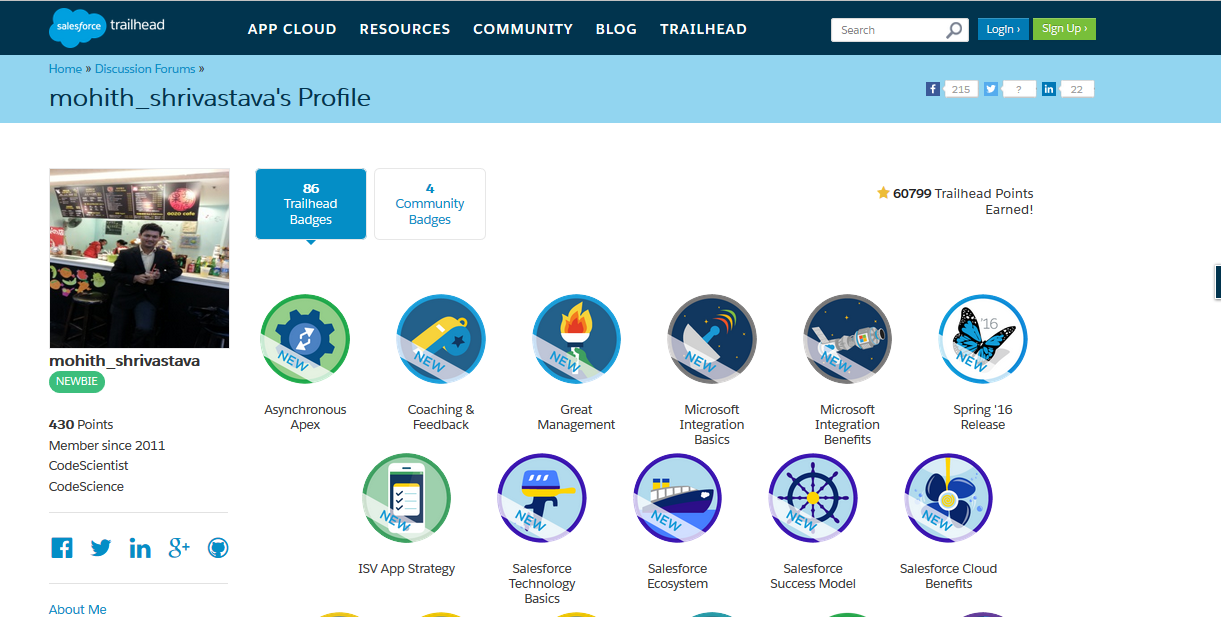
5 Reasons you want to get new set of Trailhead Badges On TrailHead

Last night I smashed new badges available on Trailhead and here are 5 main reasons I would recommend all devs and consultants  to grab them 

  • Get a feel of new release features upcoming in Spring 16 release 


Spring 16 release has lots of exciting new features .Either you are business consultant or developer with the platform ,you will be amazed to see new features added for lightning components lightning experience ,sales cloud ,service cloud ,marketing ,community cloud and analytics cloud .

Please note that this is a limited edition badge .Its very clear summary of whats available with Spring 16.So hurry up !!!


  • ISV App Strategy 


Are you planning to get your application on appexchange and make some money ? App Strategy module is for you .There are critical things to understand when it comes to app marketing .Do you want to dig deeper in terms of terminology like OEM and ISVForce ,this module will be ideal read .

If you are solution architect working for ISV companies ,you should definitely read this . The modules digs deeper into specific areas like which edition and what should be licensing model for various applications and business needs .

  • Hands on experience with asynchronous in Apex 


This module is a must if you are technical architect and advanced developer where you want to know the options available in apex to go asynchronous .You will explore batch jobs ,schedulers , flex queues ,queueabale interfaces .

This has some exercises for you to complete before you claim this badge but definitely worth the time as you learn lot of new stuff .

  • Microsoft and Salesforce Integration Overview and benefits


Salesforce and microsoft are in deep love .Micorsofts and salesforce both are working together to provide some cool integration's so that customers leveraging microsoft and salesforce CRM can be benefited best out of both technologies .There are two excellent modules covering some cool products like salesforce for outlook or Outlook webApp plugins ,installations ,features and functionality .

  • Learn some management tips and coaching tips and become self aware


This is almost like getting some management tips without management degree .Overall these modules are just great and provide great insight into how to become a better manager .

There are 2 modules that focus on same and worth reading and they are fun.

Last but not least use twitter and show of your badges .Go crush it ...


Saturday, 30 January 2016

Customizing Napili Template Of SFDC For Communities - Community Cloud

Recently I have been busy working with salesforce community cloud platform and I am impressed by the new added features of Spring 16 .

You can watch the Release Readiness webinar for more details on what are added features for community cloud 

Lets talk about something which most of client (Either SI or ISV ) would love to have with the Napili template .The first question that clients ask with Napili is its flexibility to customize and tailor to their specific needs .

The very straight forward questions that people familiar with Napili template ask are as follows 

Can I change the CSS and look and feel ?      
        
   Well yes and No ....The new branding editor you can sparingly use CSS and change look and   feel   and community editor can also help you to some extent to change labels and the color and you can really get closer to what you want .Just note that efforts will be high if we want to change the entire template design.

Will i be able to populate data from custom objects and standard objects and Will i be able to build my own pages ?  

Certainly yes .You can first choose your lightning templates and then build lightning components and drag and drop them .If you understand art of possibilities ,then i am sure its all about working with designer and nailing the UI with mutual consent .    

Can i integrate with third party systems ?Say your knowledge or content is outside SFDC ,Say your idea portal is different ,you want Single Sign on to work as well

The answer is yes and you will build lightning components and use apex to make callouts to external world .I have a sample blog that shows how to build components for communities .

How will I get the context variables of the lightning page so that I can pass those variables to external system to get the data related to that search item ?

A simple example for this use case could be ,I am looking at Topics page of the community and I want to get data from external world related to that topic .

Lets go in detail here on the challenge in hand ...Take a look at one of my stackexchange question i posted lately and got no response nor upvote to appreciate the question 

http://salesforce.stackexchange.com/questions/105627/napili-template-standard-search-event

Ok so context variables in simple terms can be imagined similar to Standard Controller ID ...So the question is how can i identify which Topic I am browsing in my lightning component to fetch matching terms related to that Topic from external world ..The document does horrible and gives no clue .Imagine its Utility for ISV apps .

Lot of ISV partner would like to know the context User is browsing so that their lightning component can give right results in the widget they have on appexchange.

So yes Finally lets come to main aim of this post 

How to find context variables values so that I can build my lightning component based on those ?

Here is the hidden secret (At least no document confirming this)

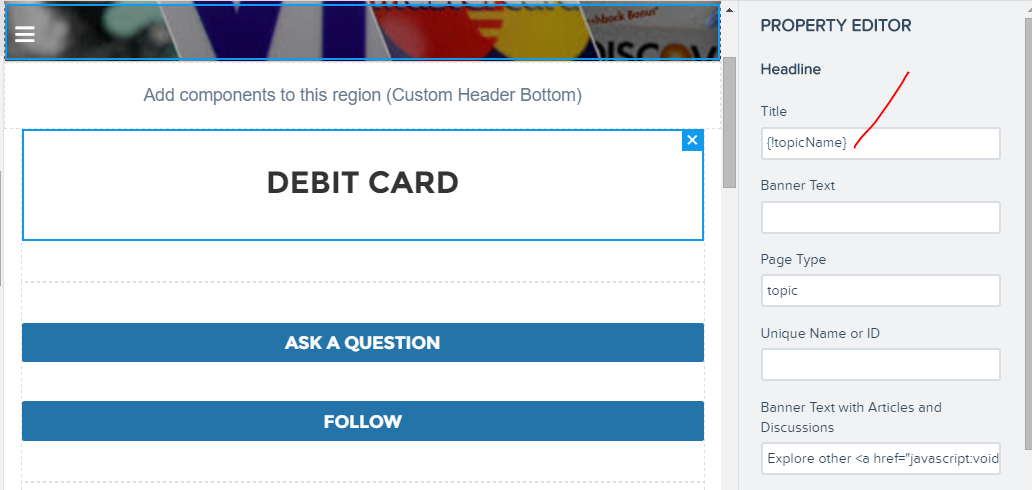
Every page inside community builder is a lightning page .Check below screenshots ..


Also every page has some environment variables listed ,


Lets try to capture these and read these via lightning component to see what they actually have 

A sample lightning component code to read the Topic name can be as below


The Design file is most important to capture environment variables

The apex code ::

The last part is configuration when the component is dragged to community builder .Place the exact context variables to derive values from them 

The key again here is to have a design value and use same merge variables as it is used in other variables on the page .

The output is as below when accessed in Topic page


In short the conclusion is ---"One can create design file and use same context variables as other components uses on a lighting page and use the variables to send back to apex to get data related to that context ".

This also answers my own question on stackexchange 


I hope this is a framework for many upcoming appexchange ISV apps and also many communities .Please share this post in case you liked it .

Introducing Lightning Base Components

Lightning Base Components are great addition to the platform and in fact revolutionary .One of the concerns around lightning component ...