Saturday, 30 January 2016

Customizing Napili Template Of SFDC For Communities - Community Cloud

Recently I have been busy working with salesforce community cloud platform and I am impressed by the new added features of Spring 16 .

You can watch the Release Readiness webinar for more details on what are added features for community cloud 

Lets talk about something which most of client (Either SI or ISV ) would love to have with the Napili template .The first question that clients ask with Napili is its flexibility to customize and tailor to their specific needs .

The very straight forward questions that people familiar with Napili template ask are as follows 

Can I change the CSS and look and feel ?      
        
   Well yes and No ....The new branding editor you can sparingly use CSS and change look and   feel   and community editor can also help you to some extent to change labels and the color and you can really get closer to what you want .Just note that efforts will be high if we want to change the entire template design.

Will i be able to populate data from custom objects and standard objects and Will i be able to build my own pages ?  

Certainly yes .You can first choose your lightning templates and then build lightning components and drag and drop them .If you understand art of possibilities ,then i am sure its all about working with designer and nailing the UI with mutual consent .    

Can i integrate with third party systems ?Say your knowledge or content is outside SFDC ,Say your idea portal is different ,you want Single Sign on to work as well

The answer is yes and you will build lightning components and use apex to make callouts to external world .I have a sample blog that shows how to build components for communities .

How will I get the context variables of the lightning page so that I can pass those variables to external system to get the data related to that search item ?

A simple example for this use case could be ,I am looking at Topics page of the community and I want to get data from external world related to that topic .

Lets go in detail here on the challenge in hand ...Take a look at one of my stackexchange question i posted lately and got no response nor upvote to appreciate the question 

http://salesforce.stackexchange.com/questions/105627/napili-template-standard-search-event

Ok so context variables in simple terms can be imagined similar to Standard Controller ID ...So the question is how can i identify which Topic I am browsing in my lightning component to fetch matching terms related to that Topic from external world ..The document does horrible and gives no clue .Imagine its Utility for ISV apps .

Lot of ISV partner would like to know the context User is browsing so that their lightning component can give right results in the widget they have on appexchange.

So yes Finally lets come to main aim of this post 

How to find context variables values so that I can build my lightning component based on those ?

Here is the hidden secret (At least no document confirming this)

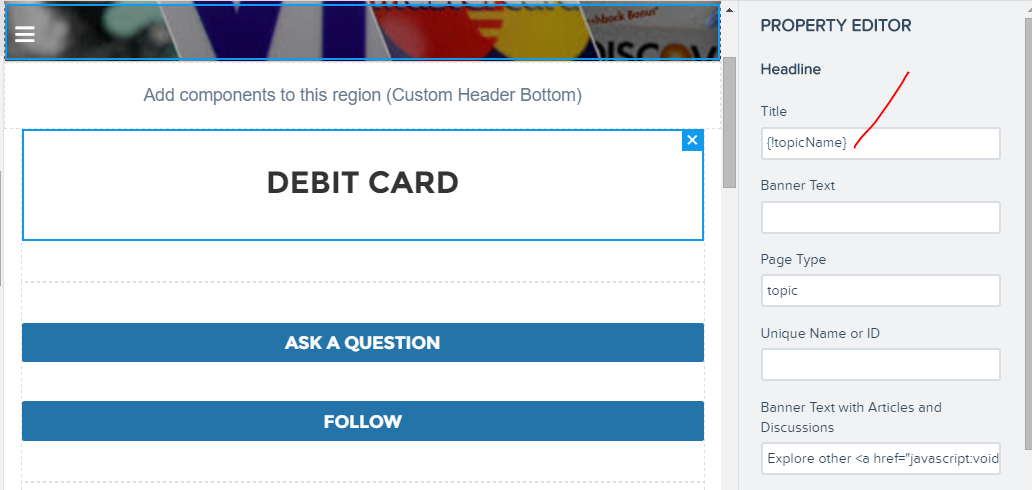
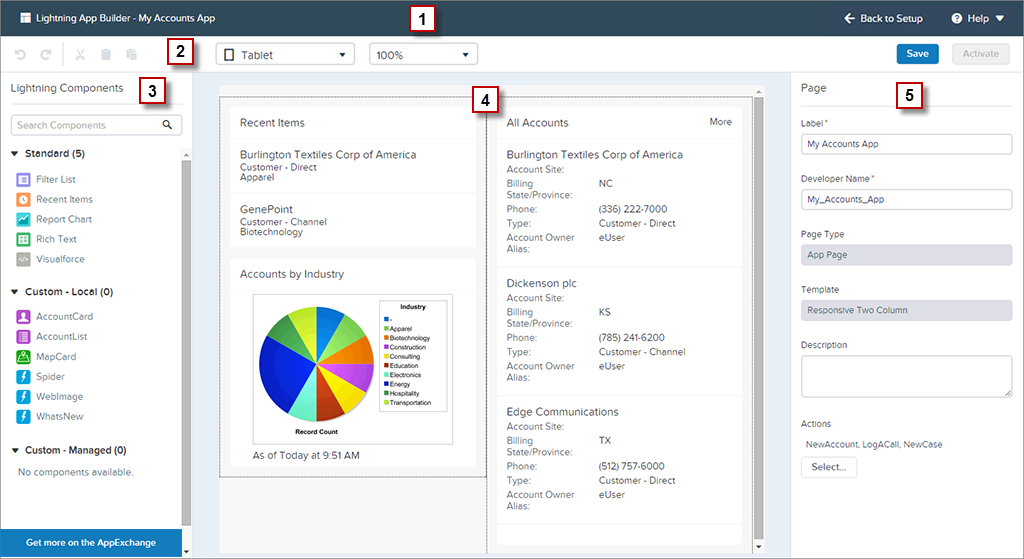
Every page inside community builder is a lightning page .Check below screenshots ..


Also every page has some environment variables listed ,


Lets try to capture these and read these via lightning component to see what they actually have 

A sample lightning component code to read the Topic name can be as below


The Design file is most important to capture environment variables

The apex code ::

The last part is configuration when the component is dragged to community builder .Place the exact context variables to derive values from them 

The key again here is to have a design value and use same merge variables as it is used in other variables on the page .

The output is as below when accessed in Topic page


In short the conclusion is ---"One can create design file and use same context variables as other components uses on a lighting page and use the variables to send back to apex to get data related to that context ".

This also answers my own question on stackexchange 


I hope this is a framework for many upcoming appexchange ISV apps and also many communities .Please share this post in case you liked it .

Monday, 18 January 2016

Lightning components - Where all can I have thee...

With Salesforce investing lot on lightning components and I am sure lot of devs in salesforce world have started working with lightning components .

I have also started working on lightning components and below is some cool list on where all currently salesforce allows these components and a small snippet for each showing the interface that lightning component must implement .

Exciting ...Exciting ...Lets start...


  • Add Lightning Components to Salesforce1


 The appHostable interface makes the component available as a custom tab.

All that one has to do is to create a lightning custom tab from salesforce Tabs and add to SF1 Navigation's .


  • Add Lightning Components to Lightning Experience


The interface implemented remains as appHostable .The key here is how we can add this tab to new App launcher 


  • Configure Components for Communities

  • Configure Components for Lightning App Builder

  • Configure Components for Lightning Experience Record Home Pages (PILOT)


A good example can be one demonstrated by BalaKishan.Please read his articles on lightning .Some great insights into it .

The key here is you have an attribute recordId and sObjectName populated automatically with correctId and API name


<aura:attribute name="sObjectName" type="String"></aura:attribute>
    <!-- Atrribute Defination for Record Id -->
 <aura:attribute name="recordId" type="String"></aura:attribute>

  • Add Lightning Components to Visualforce Pages
This is coolest feature that's been added lately .To add a lightning component to the VF you first define an aura:application that has aura:dependency and extends  ltng:out .

The sample component code The VF code will look like below

I hope you enjoyed this little article :)

Sunday, 10 January 2016

Lightning Components Tokens

One of the coolest addition to lightning components in Spring 16 release has been Lightning components Tokens .This feature is in developer preview mode and I already see use case for this feature .

Tokens make it easy to ensure that your design is consistent, and even easier to update it as your design evolves.

In this blogpost we will discover how to create these design tokens and how to use it inside the lightning components .I am using spring 16 pre-release org to demonstrate .This feature will be available only after your sandboxes are upgraded to spring 16 release .

Developer console is quickest method to edit and create lightning resources .In developer console you will see lightning tokens 


To create a design token simply click on the lightning Tokens

File | New | Lightning Tokens.

One important thing thats mandatory is to name the lightning Tokens file as "defaultTokens" .This is very important the tokens defined within it are automatically accessible in all Lightning components.

Before we actually start creating lightning Tokens file one thing to note is  Salesforce exposes a set of “base” tokens that we can access in our component style resources apart from custom tokens we create .To do this we will also extend our lightning component tokens from Base tokens .

Here is a sample lightning component tokens file 

Once we have created the file named "defaultTokens" these are directly available in any components in our namespace using small function token() .One just needs to use these in CSS resource of a component bundles.

Here is a sample example component showing how to use design tokens in CSS resource file .


It almost feels like custom labels to me but this is meant for use in the CSS design variables .It makes it easy to keep all design variables in a single resource and any change or update later one can avoid duplication of code and update from one single file .

I am eagerly waiting to see updated lightning components developer guide where salesforce will expose some of the tokens used in the SLDS .

Feel free to spread the word of this upcoming feature but note that salesforce safe harbour applies .

Thursday, 24 December 2015

Apex Testing goodness in spring 16

Spring 16 release notes has been great read .If you have not read ,find some time and do a quick scan to discover some really cool features .

Apex Testing enhancement coming  in spring 16 caught my attention and this blog post covers them in detail .


1)Ability to set createdDate value for test data before Test.startTest()


The below test class demonstrates this new feature 


2)Test Suite


Test suites provide ability to run group of test classes together .On developer console you will find that you have ability to create a New Suite and use New Suite Run to run multiple suites or a single suite .Test Suites functionality is also available through Tooling API .I wont be surprised if this feature is added in some of IDE like Mavensmate or Welkins Suite 


The Suite Manager helps to add or remove Test classes to existing suites or form a new suite or delete existing test suites.

3)Stop a Test Run That’s Failing Miserably

You can now configure test runs to stop executing new tests after a given number of tests fail. You no longer need to waste your time waiting for the results of a run that you’re going to rerun after fixing issues in your org. You can set how many tests can fail in test runs that you execute both in the Developer Console and using the Tooling API.

The Developer Console’s test run configuration panes have a new Settings button. 
To specify how many tests can fail before a test run or test suite run is canceled, click Settings, enter a value for Number of failures allowed, and then click OK. This value applies for all test runs that you execute, until you close the Developer Console or set a new value.

I don't see this yet in spring 16 preview org and i assume it will be delivered .

4)Call Test.startTest() to Reliably Reset Limits in Apex Tests

5)Use @future to Avoid the Dreaded MIXED_DML_OPERATION Error in Apex Tests

To avoid mixed DML we used future method to separate transactions and this caused failures in test class .There are number of workarounds available 

1)We wrapped the code in future method with system.RunAs 
2)Also we  enclosed the code block that makes the future method call within Test.startTest and Test.stopTest statements.

check below link to know the workaround used before this release

https://developer.salesforce.com/docs/atlas.en-us.apexcode.meta/apexcode/apex_dml_non_mix_sobjects_test_methods.htm

All these workarounds no more needed and test class now does not throw mixed DML

Check the example documented for more details

https://releasenotes.docs.salesforce.com/en-us/spring16/release-notes/rn_apex_tests.htm#rn_apex_tests_limits 

6)Test support for asynchronous WSDL based callouts

There is a neat example on how to approach test case for asynchronous WSDL callout in apex guide 

https://releasenotes.docs.salesforce.com/en-us/spring16/release-notes/rn_apex_tests.htm#rn_apex_tests_limits

Overall there has been great improvement in Testing framework of the apex .Test classes are very important for all apex code on platform .This needs to be seriously taken and great to see SFDC doing its best to enhance testing capabilities .

Friday, 18 December 2015

Trailhead Awesomeness Continues...

Last night I completed new modules and new project on Trailhead and I must admit Trailhead continues to impress me .Its been one of the best online training resource we have to get trained on force.com platform .

Lets talk about what will you learn once you complete these new modules and why it is worth to spend time on these

Boost your Apex Integration Skill set

Apex Integration Services


One of the key challenge for force.com developers who are new to the platform is they lack knowledge around art of possibility around Integration of force.cm platform with external system using apex services .One of the main cause has been lack of easy step to step guide so that they can follow and learn these techniques .

The new module Apex Integration Services is a great step forward .I was surprised how challenging these exercises are to crack and it makes sure you understand the concepts well .I strongly recommend cracking this module to gain expertise around integration via apex .

Take your ability to debug and write formulae in force.com to next level

Advanced Admin Trail
Advanced Formulas module is amazing and worth cracking it .It took me an hour being advanced and experienced dev so if you are new this may take more time .You will write some cool validations rules and some complex formulas .After this module i am sure you will be fearless when it comes to writing or debugging some complex formulas .Also note that this is part of new Trail Advanced Admin .

Continue your lightning experience adventure with new modules LEX chatter basics and LEX data management


LEX Data Management

LEX Chatter Basics


Lightning experience is the future of salesforce .With new modules you will continue to understand how to leverage chatter in lightning experience and also understand how to import and export data via dataloader and import wizard provided in the set up menu .

Build an awesome app learning platform basics and also give yourself a chance to win Astronomical Prizes


Battle Station App

This module helps you to learn platform basics and at the end you give yourself a chance to win some cool prizes .So hurry and get this done before 31st dec .The project link is below ,click and get started.The project will teach you how to create apps ,build objects and fields on force.com platform ,write business logic using process builder and workflows ,how to create reports and dashboards and how to use SF1 mobile app to expose the functionality for mobile devices.


Apart from these  Application Lifecycle Management module  is being rewritten to provide more awesome content .

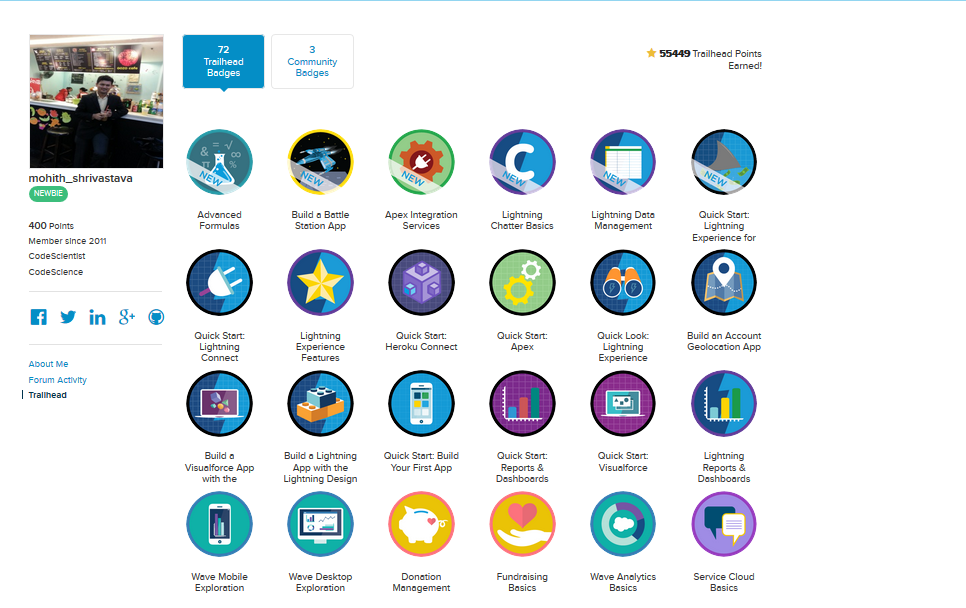
Enjoy Trailhead and dont forget to post your selfie with badges completed on twitter .Also now you can add those badges to your linkedIn profile .

Trailhead Selfie

Sunday, 6 December 2015

IOS and Visualforce in Salesforce 1 app Hicups

Lighting is out and looks like its  the future of customization of Salesforce 1 mobile pages .Speaking of present still we have large number of apps having visualforce page for the Salesforce 1 app build using either angular(or other frameworks ) or plain old visualforce styled to responsive design .

This blogpost is sharing some insights into common issues that I encountered with Visualforce inside SF1 container when I was testing the functionality with iPhone or iPad.


Lets list all of them one by one and list the work around for issues as these have no proper fix and are logged as issues by SFDC


1)Key freezing issue with HTML input tags


This is one of the primary issues that's  really show stopper .If you have a visualforce and you use apex:input or normal HTML input and double tap the cursor on the text field you will notice that your keys are freezed and text you enter dont appear on the input box .


This looks to be serious issue with new version of IOS and Salesforce 1 app .Even you are using twitter typeahead for autocomplete or lookups this issue can be easily observed and keys will freeze once you make selection .


The workaround for this is to include a small script at the bottom of the page that resolves this .Please note this is a workaround until this is fixed officially


2)Not able to scroll the iframe embedded in Visualforce inside SF1 container for iPad or iPhone 

This is another common bug and has something to do with IOS webkit inside SF1 .The workaround is below small snippet that adds scrolling behavior needed


There are also certain things that we need to note about navigation pattern we follow in SF1 specific apps

1)When navigating to the external world the right function to use is as below

navigateToURL(​url​[, isredirect])

If you want SF1 container not to remember the history set redirect parameter to the true state.

2)Use back function to navigate to the back and use redirect parameter as true if you want your page to refresh

back(​[refresh])

Using frameworks to develop SF1 apps can increase the speed of app build .Also for complex SF1 visualforce page if you have too many actions and you are packaging for as an appexchange app its worth to write some automation testing using selenium or using protractor whatever you feel comfortable just to not scratch your head if something breaks later due to SFDC releases or due to some code change during upgrade.

I hope you enjoyed this post and will help you troubleshoot issues with SF1 app

Thursday, 5 November 2015

Using Lighting Out with Visualforce

Lightning out is awesome feature and it is correct way of integrating mashups .With lightning out one can easily take lightning components outside salesforce .Some of the examples of system that can consume this includes Heruko , SAP ,Sharepoint and so on .

For external system mashup you will need to first establish connection with SFDC using connected apps .

There is an excellent  session on this topic .

 I have found multiple blogs demonstrating the concept where the lightning component attribute is set from the data inside visualforce .Some of them are as below

Balkishankachawa.wordpress.com/2015/10/31/lightning-component-javascript-remoting-and-visualforce-page/

http://peterknolle.com/lightning-components-in-visualforce/

In this blog we will see how to get the component values out of lightning into our Javascript variable so that we can continue with  more fun of mixing Visualforce and lightning components .

USE CASE :::

My entire Visualforce page used no apex:form and it used pure HTML ,SLDS CSS and Javascript remoting for actions .Now comes the big change in requirement ,need Rich text input field .

I googled to figure if HTML-5 has rich text fields or are there any native solutions without adding the apex:form element and apex:textarea .Introduction of apex:form implies lot of viewstate and makes page slow .

Lightning components interestingly provide "ui:inputRichText"  which is rich text on the webform  .Exciting !!! ..Now comes the challenge of integrating the lightning component into the visualforce and then grabing the set text from the lighting component back into visualforce .

Using lightning out we can integrate a component into visualforce with few lines of javascript .

We will also see how to use the callback function provided to grab the component attribute value back into our visualforce page 

COMPONENT CODE::

If you are familiar with lightning components its 101 of that .A simple component being embedded .

LIGHTNING DEPENDENT APP:

This is similar to declaring dependency just like how we write import statements in java or node.

VISUALFORCE CODE::

The most important part of visualforce code here is way we have declared a javascript variable and pulled the Component into  global variable to access it outside the component and use right away in our visualforce

         var richtext;
             $Lightning.use("c:RichtextApp", function() {
                 $Lightning.createComponent("c:Richtextcmp", {},
                     "richTextEditor",
                     function(cmp) {
                         // do some stuff
                         richtext = cmp;//Very important
                     });

             });

The final screens are below


The console.log clearly prints the what ever is typed in the editor showing how easy it is to get values out of the lightning component.

Introducing Lightning Base Components

Lightning Base Components are great addition to the platform and in fact revolutionary .One of the concerns around lightning component ...