Sunday, 10 May 2015

Integrating Google drive with Salesforce Using File Connect Feature

Summer 15 release is out and lot of features to dive into .One thing that caught my immediate attention was ability to integrate Google Drive with Salesforce through lightning connect .

It hardly took me 20 minutes to get this working on my developer edition and I am super excited to highlight step by step procedure to configure this .Please note salesforce did an amazing job on the documentation for this .Its crystal clear to me .


Just to add little more flavour with screenshot would help many folks I believe who have no time to read through documentation .(I strongly suggest please read through release notes )


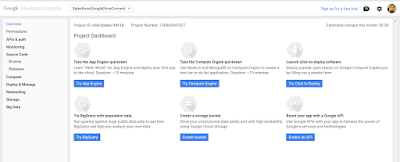

Step 1

Enable File Connect in your instance .Please note since this is summer 15 release feature i did this in pre-release org 


Step 2

Allow your users to access google drive .Follow the step by step instruction documented in below link


Below shows the permission set that I have created .Remember to check file connect cloud permission 


Step 3

Create an authentication provider for Google Drive

The first step is to create a project in developer console of google 

i)Navigate to the developer console of google using below link 


ii)Enable Drive API and Drive SDK 


Follow below article path on more info .I am attaching screenshots to help you guide 


iii)Create web application so that you can obtain client secret and consumer key to fed back in salesforce


Step 4

Create a google auth provider in SFDC using auth provider configuration listed in document.Please note to specify type as the OPEN ID in the auth provider settings .

In the auth provider  settings you will need to provide client secret and consumer key to the SFDC from google and feed back the redirect or callback URL generated from SFDC back to google application  


Step 5

Create External data sources .Note the type as "File Connect:google drive" .This external data source needs to be added to permission and if your authentication is "per user" type your end users needs some training on how to add this from My Settings tab .Choose Oauth 2.0 protocol .


Validate and sync all objects .You will see an external object created in SFDC and also you will notice if you navigate to chatter files you will see all the data .


There are bunch of other features added as well in this release 

1)Files tab now can provide search layouts for searching these files and no need for searching from chatter

2)Focus Search on a Single External Data Source

3)Files Connect could previously access only standard fields from external data sources. But in Summer ‘15, you can add any custom fields and display them in unique search layouts.

4)Lookup Relationships Supported for Files Connect External Objects

Read through release notes and explore more .Lot of solid stuff in this release and make me wonder "Do salesforce engineers ever sleep". They sleep or not but for consultant like me ,they keep me awake by adding lot of features to the Product .

Hope this feature will make your customer happy that you can access all information from google drive now .

Tuesday, 28 April 2015

Responsive Bootstrap Calendar In Visualforce

Making Visualforce work for all forms of devices is common ask these days .Gone are they days when we used plain old school Visualforce with pageblocks and pageblock tables to present data to the User .

The number of mobile devices has dramatically increased these days and technology is moving rapidly to mobile devices.Everyone prefers viewing the information on handheld devices along with viewing on desktops and laptops .

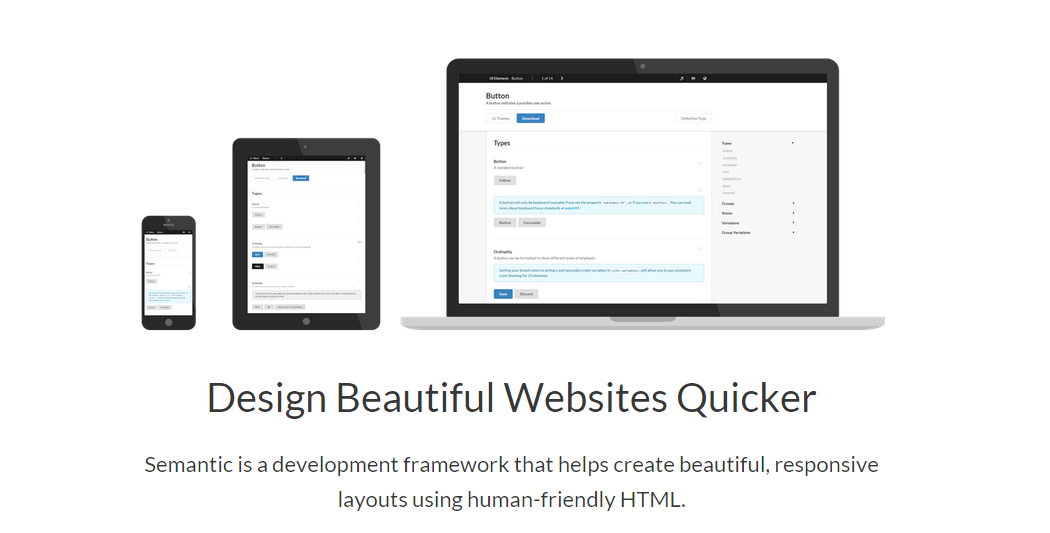
Responsive web design (RWD) is an approach to web design aimed at crafting sites to provide an optimal viewing experience—easy reading and navigation with a minimum of resizing, panning, and scrolling—across a wide range of devices (from desktop computer monitors to mobile phones).

There are some cool frameworks out there that ease development of a web page following responsive design patterns .

Some of them I would like to list in case you have not come across them 


With little bit of HTML and CSS knowledge you should be able to start .HTML and CSS and JS skills are primary for any framework .

So this blogpost is sharing how to build a responsive calendar using visualforce .

Before beginning thanks to the author serhioromano for amazing blogpost on how to use bootstrap and  Jquery to build a responsive calendar .Check his below blog that speaks lot about his work 


http://bootstrap-calendar.azurewebsites.net/


Please kindly note the real rock star is  serhioromano  who has built this .My work is just making it adaptable to Visualforce and force.com platform.

Business Use Case


1)Need a calendar data from custom object and out of box salesforce calendar is not an option then 


2)Building a cool client portal with custom Visualforce and need a calendar to show events and tasks 


3)Building a public website and would like to show your company events on a calendar .


There are lot more Use cases I am sure you will discover ,having a calendar view of data helps lot.

Solution Approach


1)Reuse existing code library from  serhioromano  github repo and build an apex javascript remoting class that feeds the JSON data to the calendar api function .

2)Provide flexibility to the developers and Admin so that they can customize the calendar for any Sobject and any field by simple one liner code change .


Demo Link


I have created a public site to host my page for ease of view and please observe the responsiveness of this calendar.


http://webzone-developer-edition.ap1.force.com/webzone/Calendar


Code 


The entire code for this can be viewed from my github repository


https://github.com/msrivastav13/Bootstrap_Resposive_Calendar


Also I have unmanaged package from where you can install in your org for playing around

Use this URL to install the package into any organization:

https://login.salesforce.com/packaging/installPackage.apexp?p0=04t90000000FUls

Note: If you are installing into a sandbox organization you must replace the initial portion of the URL with http://test.salesforce.com


What line of code do I need to change for changing to other objects ?


The above lines are embedded in the component  Responsive_Calendar_View  component and a developer needs to change this line .The definitions of  attribute is provided below


In case of any issue inspect your browser console or contact me or leave a comment below .

Hope you liked this and happy coding :)

Saturday, 28 March 2015

Named Credential and Auth Provider Concept In Salesforce-Linkedin and Salesforce Integration

This is my first technical post after I have moved to Texas from Bangalore and Hope I make it interesting read 

One of the common challenges when Integrating salesforce with other external system which supports Oauth 2.0 has been to manage the Oauth 2.0 flow using custom objects in Salesforce ,where there was need for some temporary storage for storing either the access token or the refresh token or an alternative approach was to do authentication every time user makes a request to other external system.


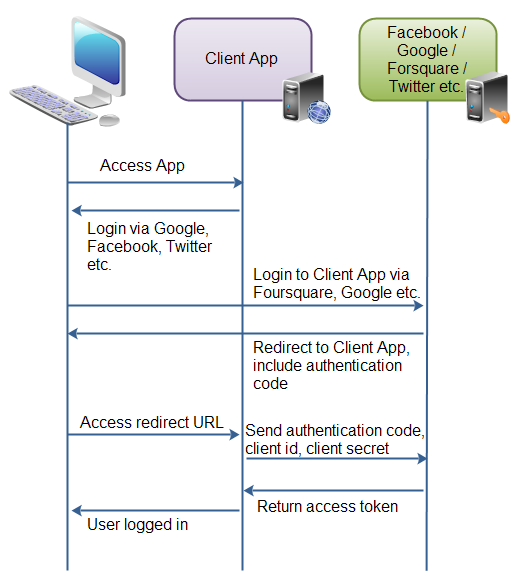
The below diagram summarizes oauth 2.0 and for more information would suggest you to read some articles in google or wiki


If i tell you for some system like google,twitter,facebook,Linkedin,google I dont have to handle Oauth 2.0 myself with lot of code and salesforce will automatically take care of it ,I don't think you will trust me .

So in this blogpost ,I will be integrating linked.in with Salesforce with very minimal code and will pull my resume as a chatter app,so grab a coffee and lets together continue doing this interesting piece of integration.

Before we do lets see how much complexity it involved in past ,

Terry Luschen  is an awesome blogger on Salesforce Integration with external system and I picked his post as starting point 


So i see that we have some 30 to 40 lines of code just to establish connection and then there is hint on how to handle refresh token and oauth token .This is excellent post almost an year back and with SFDC coming with Named Principal and Auth Provider makes life simpler for these type of Integrations.

Business Scenario-Handshake between Salesforce and Linkedin as a Proof of concept and a decent technical guide to build more robust functionality like searching linkedin data,showing linkedin feeds ,fetching related contacts to increase more contacts .There is lot of business process that you can tie up and build some cool stuff and add business value with linkedin data .

1)Configuration of Auth Provider

In Salesforce Environment navigate as below path

Administration Setup>Security controls>Auth. Providers

Fill this form and leave blank for consumer and Consumer Secret


Note URL Suffix is automatically filled once we have name.

Please note Callback login URL for next steps .This will be fed to the LinkedIn app.

2)Configuration of LinkedIn Application 

Navigate to https://developer.linkedin.com/  and click on My Apps for creating a sample application
Click on Add new App for adding your Application .

All the information is self explanatory that are required to filled except for Oauth 2.0 redirect URL which is very essential .This needs to be fetched from salesforce Auth Provider Setting .Salesforce Auth Provider once it is saved ,it will provide us with necessary URL

You will see a consumer secret and consumer key once linkedin form is saved 

The Consumer Key and secret needs to be updated back into the Auth Provider so complete the Auth Provider setting

3)Configuration of Named Principal 

This is an excellent feature thats been introduced in Spring 15 and it makes life excellent to avoid the lengthy code just to authenticate ,below is how we configure it for linkedin API

Administration Setup>Security controls>Named Principal

Select Oauth 2.0 as your authentication mechanism and Auth provider as one you just created and Identity Type as per user 

Now from API guide the URL that will be common will be https://api.linkedin.com/v1/

Hence use that as a URL for named Principal .

Also dont forget to check Start Authentication flow on Save if you need to run oauth .On Save oauth flow will happen and there will be success message if authentication is successful.

This is how the prompt will show if all successful .

Once you confirm this app to allow access ,you will see a success prompt or warning prompt confirming all success and registered .

 4)Need now apex magic to complete

Now using named principal we will do callout and fetch data inside salesforce ,parse from JSON and show in UI .

Apex code for parsing class is as below


The Code for controller doing callout and fetching data is as below


The next steps are creating tabs for VF and adding as a Subtab Application .Here is how finished product looks like .Obviously with some CSS you can make things look more fancy


Now one final question is what will happen when other users login and try and see their app .Will the app show them their profile .

When we created named principal we said our Identity Type is "Per User".

5)Assigning Permission set to other Users so that they can add their external source

So lets say I have another User in my org and he navigates to the LinkedIn profile page ,he will see his profile Info from the linkedIn if he follows below steps assuming administrator has assigned a permission set with access to the Named principal 


Each user should be trained to go to My Connected Data in their personal set up and add this as external data for working of app


Some more cool Idea would be show data in bootstrap format and make UI responsive ,Build some linkedIn search engine via API and lot .

The power of "named credential" is I have no code to run my oauth .

Please feel free to comment what you feel on this blog .I have common complain that my blogs receive no comments and no feedback :(  

Saturday, 21 March 2015

Reduce your learning Curve through Salesforce new learning tool Trialhead

4 Years back when I started Learning Salesforce ,I wish I had access to tool like TrailHead .

Please visit below URL to explore more

https://developer.salesforce.com/trailhead

What you need to complete TrailHead Challenges?
  
You will need Salesforce Developer ORG to work with TrailHead  Challenges .Make sure to have a work which has no custom domain enabled and also has no namespace.Recommend to sign up for new org.

You also require a sign up on developer.force.com .You enter into a world of Salesforce Developer Community through this site .


What will you gain by spending Time on TrailHead?

You will be able to do hands On Exercise which are carefully designed to test your understanding of the content presented and it makes sure that you work examples on developer org

What is Trailhead Badge? 

Once you complete a Challenge your developer profile on developer.force.com gets a badge to show case that you have completed all challenges and you have gained some pratical insight into subject presented in the module .


I came across this tool through twitter feeds and did not bother to try out assuming I will have no returns out of the tool since I almost knew all the topics that Initially Salesforce launched on this tool .Salesforce Lightning module was launched by salesforce when salesforce in this year Dreamforce .

I was quite confident that I would learn through salesforce release notes and developer guides .Because of hectic project work I really could not make time for going through release notes .One day I came across a twitter feed saying TrailHead is offering tutorial module on lightning components .This urged me to straight dig into this tool.

At the end of the modules ,I discovered this tool is really an excellent resource for anyone who is really new to any of salesforce topics .This is one of the reasons I went back and completed all the modules .


My favourite topic after covering all modules has been Visualforce Mobile .Lets walk through what we learn in this module

Get Started with Visualforce in Salesforce1

For a new developer before moving to this topic I would recommend to go through Visualforce Basics .Trailhead has a good module around this as well .Please visit below link if you are new to Visualforce

https://developer.salesforce.com/trailhead/force_com_programmatic_beginner/visualforce_fundamentals/visualforce_intro

Once you have completed Visualforce modules ,i would recommend some time to learn Javascript remoting and Remote Objects .This will help you understand this topic more 

You will learn how Visualforce pages can be used in Salesforce1 and also it will help you to reason out when to prefer  to develop mobile apps in Salesforce1 instead of using the Mobile SDK

Adding Visualforce Pages to the Navigation Menu

This module will help you understand how to make your VF available on your Salesforce 1 App.it covers concepts like sforce.one library

Implementing Global Actions with Visualforce Pages

This module will cover global actions and how to configure them for SF1 App.Also this will explain the the Publisher SDK and how to use CSS styling to get mobile look and feel for your Salesforce 1 app

Implementing Object-Specific Actions with Visualforce Pages

With this module you will discover you will now know how to develop VF pages and add an object-Specific action and configure the action to appear in SF1 App.

You will learn how to use publisher SDK to close the publisher and refresh the object page.

Using Visualforce Pages in Page Layouts and Mobile Cards

With Mobile Cards you can expose your VF on the Object related list in Sf1 app.This feature is explained and also you will become an expert on how to use Compact Layouts for Sf1 Apps.

Adopting User Interface Guidelines

This module came as surprise .Since I was not from design world ,I probably lacked this .This module will help you to learn responsive CSS and also the Visualforce components that should be avoided when building mobile apps.

Using CSS and JavaScript Mobile Frameworks

A complex Enterprise application will force us to adopt to one of well known frameworks when we are building an SF1 App using VF for responsiveness and ease .

Some of the JS and CSS frameworks we must be familiar for building Enterprise application  includes 

Bootstrap
Ratchet
Ionicframework
Angularjs


Hopefully this explains the importance of TrailHead .Also Trailhead team I have been knowing from Salesforce have been super helpful.

Please contact Josh,Sandeep Bhanot or Chris Duarte for any serious issues .I have tested all modules so far and they work great .

Tweet me if any issues and I am glad to help .

Also Trailhead has a developer forum and you can raise your issues here and developer community will be happy to help.


Sunday, 1 March 2015

Trialhead -Self Tutor

I have no words for TrialHead that was launched in dreamforce last year .I experimented using TrialHead for lightning module last week and I must say worth spending time on TrialHead .

I am very new to Lightning and I had read Release notes and Lightning developer guide but somehow I was not so confident .I must say once I have completed challenges on the TrialHead for these modules my confidence level has gone up.No more I feel that I dont know basics since I have coded the assignments asked and have passed all those to earn badeges.


I am thankful to creators of this tool and this has made learning real fun .The great team at salesforce Sandeep ,josh or Chris Duarte are really helpful .I have reached them no of times on twitter if i find any difficulty related to any problem in Trailhead and they have been super helpful .

Thanks TrailHead and I have requested for more lightning related tutorials on this . Please note Trailhead is free of cost and your best tutor.

Invoking Apex Callout From Process Builder

Process builder is GA in Spring 15 and one of the queries I came across was around how to invoke apex callouts from Process builder .

Before process builder came we had two common approaches of calling webservice 


1)We have outbound messages as one of the Actions for workflows.This works if other party implements the WSDL that is generated once Outbound messaging is defined with appropriate end point .


2)Most of times future method invoked through triggers allowed to do apex callouts and invoke external web service provided the future method is annotated with @future(callout=true).This provides lot of flexibility and one of the best approaches .


3)Flow triggers was in BETA and this was also one of the ways we could invoke callouts provided the Flow implements process plugin .To understand in detail how to implement process plugin refer to the below example


The purpose of this blogpost is to demonstrate the new possibility of invoking apex callout through Process Builder 


I tried initially to make this callout synchronous and invoke apex callout directly inside @InvocableMethod and received uncommitted pending DML issue and I have no solution for this and may be an Idea post to salesforce to allow this .


My approach included below steps 


1)Invoke apex through process builder using @InvocableMethod

2)Use Future method inside @InvocableMethod and invoke apex callout 

Creating Process Builder Flow


1)Navigate to Process Builder 


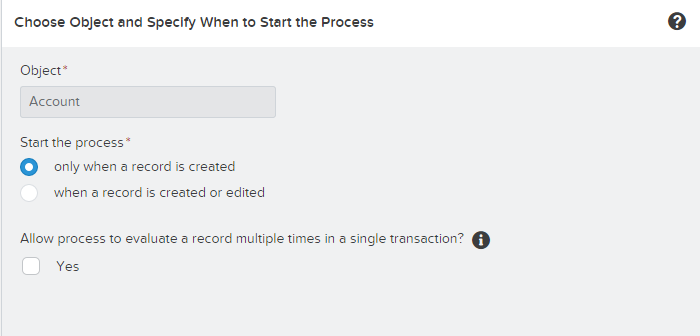
2)Specify the Object and when to start the process setting


3)Define Criteria for our action defined


4)Define the action ,here our action comprise of calling the Apex method annotated with @InvocableMethod


The input variable of apex method needs to map to related record ,here it maps to Account object .

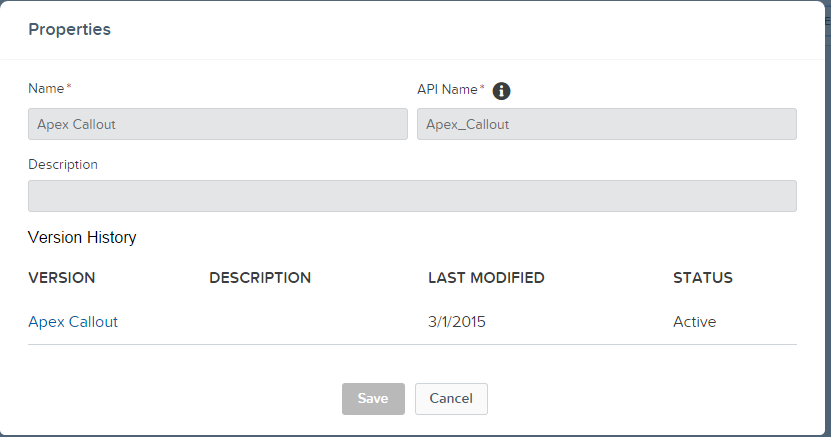
Below is the code for the MakeApexCallout class ,Future class and also the JSON parser weather info class

For callout for this example I have used a sample REST API from api.wunderground.com that is available for free

The response is JSON which returns the Zipcode also and we stamp Zipcode returned from the response on the Account record .

A small video demonstrating this is as below


I am quite surprised that even though it happens in future but after the page refreshes the value is found stamped on the record (Almost given us feel to naked eye that it happened synchronously )


I hope you enjoyed this post and any queries or solution please let me know .


Sunday, 15 February 2015

Creating My First Analytics Cloud Dashboard

Last post we discovered how to create our first Analytics cloud report from the dataset .This post will show how to create interactive dashboards using Analytics cloud platform.

This will be again step by step tutorial assuming developer or data team has created Dataset for us to build reports and Dashboards .

Business Scenario -Need an Interactive Dashboard which will show Revenue generated from opportunity grouped by Account and left Panel will be a list showing different fiscal quarter and based on selected quarter results will auto filter out

Step 1-Create a report for the Chart with opportunity Amount and GROUP BY Account Name

i)Search for opportunity dataset 


ii)Create a sample report with Measure as Sum of Revenue and Group as Account Name 


iii)Clip this report .Note this is a very important step when you are building a dashboard

The above screenshot shows the clipper highlighted in RED colors.

iv)A new tab will open and shows as "New dashboard"

Step 2-Create Second report with Fiscal quarter as GROUP BY and COUNT as Measure 

i)Switch to the opportunity tab and create a report  with FISCAL quarter GROUP BY and clip it as well

Make sure to clip this and make sure dashboard screen shows both the reports 


Step 3-Select List as dashboard type 

i)Once you select list the screen is as displayed below


Click on 2nd report and this will automatically add to the list .

Rearrange and remove the selected measure field and keep it none .

ii)Select the chart type now and add 1st created report by clicking on the first created report

Once you have all ready your screen is as below


Click on the green button at extreme right  to run this 

You can also save this report to the folder .


Here is the simple demo of dashboard


Introducing Lightning Base Components

Lightning Base Components are great addition to the platform and in fact revolutionary .One of the concerns around lightning component ...