Sunday, 12 July 2015

Salesforce Lightning Components Hello World SPA Project

Lightning component framework from salesforce is amazing add on to platform .To build Single Page Applications there are lot of modern  framework like angular ,backbone,ember,meteor,react Js and lot more.Every framework comes with its own advantages and disadvantages .Salesforce lightning is one among them which is fast maturing .

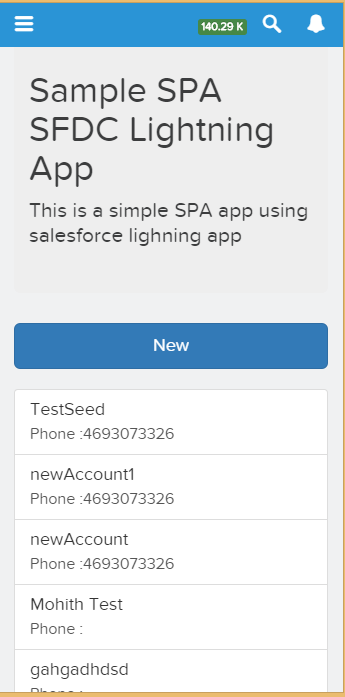
I was reading through lightning component developer guide recently and just to explore  art of possibilities I did a quick Lightning SPA project that shows below listed  functionality:

  1. Quick Add ,Edit and Delete Account to Salesforce from standalone lightning App or Salesforce 1
  2. Using bootstrap library for UI in lightning project
  3. How to achieve simple navigation using CSS toggle 
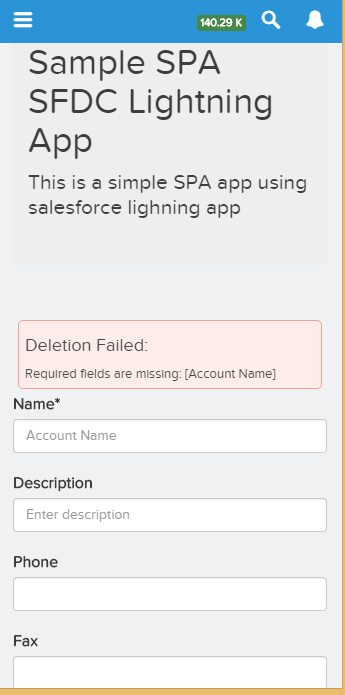
  4. How to display error messages from server by dynamically creating lightning component markups
  5. Effective use of Events to communicate between components .
Lets take a demo video of the application before deep dive into some of the awesome stuff I have


Some of the key points I noted while doing this SPA Project are as below

Events :

Events are really cool .If you are not familiar with event driven pattern then you will have some tough time .In event driven pattern key is two components communicate with each other using events .There will be  Subscriber component and a publisher component .

Publisher component will publish event using aura:register tag.The events needs to be fired on action from button click or through any events.A simple example in my application when I create New Account ,my edit component fires an event and the main LightningSPA component listens to the Event and performs necessary actions needed 


The below code self explains the principle of firing events and then handling the event back 


Routing:

I miss angular routing here where one could easily navigate between templates .If your application is not running as standalone and you want only for salesforce 1 mobile client ,there are bunch of navigation support provided 


If we need for both standalone and SF1 one way document recommends is using below code

For my app I  prefered old  school approach of toggling using CSS as it makes it super fast .


Displaying Error Message:

Error handling at client side is easier if we dynamically create alert messages .One of the approaches for same is as below 


What are key things that would be needed if you are submitting for security review

  1. Make sure FLS is handled in backend code for apex 
  2. Make sure you do DML access check at backend apex
  3. As far as possible avoid use of third party libraries (We cant totally avoid agree),but would recommend to use framework specified tags 
  4. Name space your bootstrap .There is an online tool that can help you do this https://bootstrap-namespacer.herokuapp.com/
  5. Avoid usage of aura:unescapedHtml
  6. On page load init handlers avoid DML .
Few more documented below


The fun part 

I am sharing all code in my github library .So feel free to pull and do changes ,suggest changes ,tweet me concerns .




Saturday, 20 June 2015

Installing Lightning Package Plugin On Sublime Text On Windows 8

Building Lightning components is next task we will all be bombarded with as Lightning from salesforce emerges as a mature framework .

Having proper developer environment set up locally helps us to code effectively and helps to organize code .Subime text 3 editor makes editing files simpler and mavens mate plugin for writing apex and VF is great.

For lightning components we luckily have a package control plugin which we can install on top of sublime text and edit lightning components directly using mavensmate .

Already Raja from Salesforce describes how to install the plugin on MAC machine .Please watch the below video from him 


For windows machine i have one below ,if you are using windows I hope below video is helpful


Thursday, 28 May 2015

Dallas MeetUp -May 27

Last night  Dallas meetup was so much fun .I had the chance to present on Angular + Bootstrap + Visualforce with sample code .

I am so glad it went really well and also provided me opportunity to connect with lot of local folks who are excited to be a part of Salesforce Community .

Quickly wanted to share the code sample that I presented at meetup .

A simple responsive page to add Account Card was built using bootstrap and JS remoting along with angular concept of using modules .

The Presentation is at slideshare so that if you missed my session you can go through the same .It covered basics of bootstrap and angular JS and then explained the code snippet of how to use angularJs in salesforce .


Dallas meetup session  on Bootstrap + Angular + Visualforce from Mohitkumar Srivastav

The code samples I have shared on Github

Apex Controller


Visualforce Page

Hopefully this session was helpful .Please let me know how you feel about the whole session .Thanks

Saturday, 16 May 2015

Lightning Components Framework Learning Resources

Building custom lightning components will be a required skills for salesforce developers in coming years .Whenever there will be need for building SPA (Single Page Applications) for Salesforce 1 ,using lightning components will be one of the architecture choice .

Although  there are multiple frameworks that one could use which includes angular,backbone,ember etc but lightning is from salesforce and uses aura framework hence it will be really good candidate to consider for building SPA applications .

The aim of the blogpost is to share some useful resources  on how I have gained some expertise around building lightning components .

If you are familiar with javascript framework or at least have hands on experience with one of them ,your learning curve for lightning components will be pretty small.If you don't have none or never worked on Javascript ,you may like to go through some of javascript course and get yourself up to speed.

The key point to understand will be while building lightning components  the javascript code will follow event driven pattern .Each component can emit events and other components listen to  different events and perform server side logic .You will find minimal server side calls will be made and rest of Dom manipulation will happen with client side javascript controller and javascript helper .

Lets take a look at  various resources that helped me to learn lightning components 

1.TrailHead


This is by far the best methods to learn about how to build lightning components .The Trailhead has a module Lightning components that will force you to do hands on exercises and passing them you will feel confident enough that you have understood basics of lightning component  framework.

Trialhead  on learning lightning component is located at below URL


2.QuickContacts App Tutorial from Christophe Coenraets


This tutorial is amazing and thanks to Christophe for all awesome work .This tutorial will walk through building a quick contact app step by step .

The tutorial can be found in the below URL 


3.ReidCalberg Newbie Lightning Component Notes


This notes is quite comprehensive and thanks to author for excellent write up .Below is the URL where you can grab the notes and start working 


4.Video Tutorial from Salesforce MVP .


This video is good resource and worth watching all the modules


5.Paul Battison Videos 


Paul is a salesforce MVP and I love video tutorials from him .He makes difficult concepts looks lot easy .He explains code in very simple english .I subscribed to his youtube channel ,He has put 5 videos so far on lightning and i am looking forward to more of them .

Below is the link to Paul's channel


Below are lightning specific video links 


6.Jeff's Tutorial


We all love Jeff blog and below is link for  tutorial from him


Other Helpful Resources

Apart from all this ,salesforce lately added a new tag <ltng:require /> and below blogs will help us understand more on how to incorporate external JS  libraries in our lightning component using the provided tags


Apart from all this for deep knowledge work with lightning developer guide


I hope you have enough resources to start building lightning components yourself.


Sunday, 10 May 2015

Integrating Google drive with Salesforce Using File Connect Feature

Summer 15 release is out and lot of features to dive into .One thing that caught my immediate attention was ability to integrate Google Drive with Salesforce through lightning connect .

It hardly took me 20 minutes to get this working on my developer edition and I am super excited to highlight step by step procedure to configure this .Please note salesforce did an amazing job on the documentation for this .Its crystal clear to me .


Just to add little more flavour with screenshot would help many folks I believe who have no time to read through documentation .(I strongly suggest please read through release notes )


Step 1

Enable File Connect in your instance .Please note since this is summer 15 release feature i did this in pre-release org 


Step 2

Allow your users to access google drive .Follow the step by step instruction documented in below link


Below shows the permission set that I have created .Remember to check file connect cloud permission 


Step 3

Create an authentication provider for Google Drive

The first step is to create a project in developer console of google 

i)Navigate to the developer console of google using below link 


ii)Enable Drive API and Drive SDK 


Follow below article path on more info .I am attaching screenshots to help you guide 


iii)Create web application so that you can obtain client secret and consumer key to fed back in salesforce


Step 4

Create a google auth provider in SFDC using auth provider configuration listed in document.Please note to specify type as the OPEN ID in the auth provider settings .

In the auth provider  settings you will need to provide client secret and consumer key to the SFDC from google and feed back the redirect or callback URL generated from SFDC back to google application  


Step 5

Create External data sources .Note the type as "File Connect:google drive" .This external data source needs to be added to permission and if your authentication is "per user" type your end users needs some training on how to add this from My Settings tab .Choose Oauth 2.0 protocol .


Validate and sync all objects .You will see an external object created in SFDC and also you will notice if you navigate to chatter files you will see all the data .


There are bunch of other features added as well in this release 

1)Files tab now can provide search layouts for searching these files and no need for searching from chatter

2)Focus Search on a Single External Data Source

3)Files Connect could previously access only standard fields from external data sources. But in Summer ‘15, you can add any custom fields and display them in unique search layouts.

4)Lookup Relationships Supported for Files Connect External Objects

Read through release notes and explore more .Lot of solid stuff in this release and make me wonder "Do salesforce engineers ever sleep". They sleep or not but for consultant like me ,they keep me awake by adding lot of features to the Product .

Hope this feature will make your customer happy that you can access all information from google drive now .

Tuesday, 28 April 2015

Responsive Bootstrap Calendar In Visualforce

Making Visualforce work for all forms of devices is common ask these days .Gone are they days when we used plain old school Visualforce with pageblocks and pageblock tables to present data to the User .

The number of mobile devices has dramatically increased these days and technology is moving rapidly to mobile devices.Everyone prefers viewing the information on handheld devices along with viewing on desktops and laptops .

Responsive web design (RWD) is an approach to web design aimed at crafting sites to provide an optimal viewing experience—easy reading and navigation with a minimum of resizing, panning, and scrolling—across a wide range of devices (from desktop computer monitors to mobile phones).

There are some cool frameworks out there that ease development of a web page following responsive design patterns .

Some of them I would like to list in case you have not come across them 


With little bit of HTML and CSS knowledge you should be able to start .HTML and CSS and JS skills are primary for any framework .

So this blogpost is sharing how to build a responsive calendar using visualforce .

Before beginning thanks to the author serhioromano for amazing blogpost on how to use bootstrap and  Jquery to build a responsive calendar .Check his below blog that speaks lot about his work 


http://bootstrap-calendar.azurewebsites.net/


Please kindly note the real rock star is  serhioromano  who has built this .My work is just making it adaptable to Visualforce and force.com platform.

Business Use Case


1)Need a calendar data from custom object and out of box salesforce calendar is not an option then 


2)Building a cool client portal with custom Visualforce and need a calendar to show events and tasks 


3)Building a public website and would like to show your company events on a calendar .


There are lot more Use cases I am sure you will discover ,having a calendar view of data helps lot.

Solution Approach


1)Reuse existing code library from  serhioromano  github repo and build an apex javascript remoting class that feeds the JSON data to the calendar api function .

2)Provide flexibility to the developers and Admin so that they can customize the calendar for any Sobject and any field by simple one liner code change .


Demo Link


I have created a public site to host my page for ease of view and please observe the responsiveness of this calendar.


http://webzone-developer-edition.ap1.force.com/webzone/Calendar


Code 


The entire code for this can be viewed from my github repository


https://github.com/msrivastav13/Bootstrap_Resposive_Calendar


Also I have unmanaged package from where you can install in your org for playing around

Use this URL to install the package into any organization:

https://login.salesforce.com/packaging/installPackage.apexp?p0=04t90000000FUls

Note: If you are installing into a sandbox organization you must replace the initial portion of the URL with http://test.salesforce.com


What line of code do I need to change for changing to other objects ?


The above lines are embedded in the component  Responsive_Calendar_View  component and a developer needs to change this line .The definitions of  attribute is provided below


In case of any issue inspect your browser console or contact me or leave a comment below .

Hope you liked this and happy coding :)

Saturday, 28 March 2015

Named Credential and Auth Provider Concept In Salesforce-Linkedin and Salesforce Integration

This is my first technical post after I have moved to Texas from Bangalore and Hope I make it interesting read 

One of the common challenges when Integrating salesforce with other external system which supports Oauth 2.0 has been to manage the Oauth 2.0 flow using custom objects in Salesforce ,where there was need for some temporary storage for storing either the access token or the refresh token or an alternative approach was to do authentication every time user makes a request to other external system.


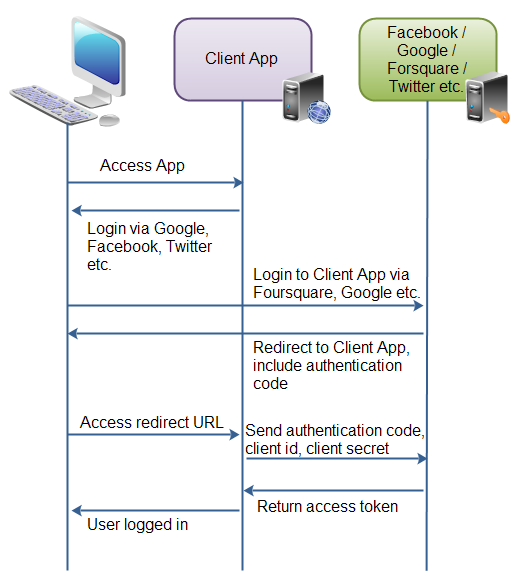
The below diagram summarizes oauth 2.0 and for more information would suggest you to read some articles in google or wiki


If i tell you for some system like google,twitter,facebook,Linkedin,google I dont have to handle Oauth 2.0 myself with lot of code and salesforce will automatically take care of it ,I don't think you will trust me .

So in this blogpost ,I will be integrating linked.in with Salesforce with very minimal code and will pull my resume as a chatter app,so grab a coffee and lets together continue doing this interesting piece of integration.

Before we do lets see how much complexity it involved in past ,

Terry Luschen  is an awesome blogger on Salesforce Integration with external system and I picked his post as starting point 


So i see that we have some 30 to 40 lines of code just to establish connection and then there is hint on how to handle refresh token and oauth token .This is excellent post almost an year back and with SFDC coming with Named Principal and Auth Provider makes life simpler for these type of Integrations.

Business Scenario-Handshake between Salesforce and Linkedin as a Proof of concept and a decent technical guide to build more robust functionality like searching linkedin data,showing linkedin feeds ,fetching related contacts to increase more contacts .There is lot of business process that you can tie up and build some cool stuff and add business value with linkedin data .

1)Configuration of Auth Provider

In Salesforce Environment navigate as below path

Administration Setup>Security controls>Auth. Providers

Fill this form and leave blank for consumer and Consumer Secret


Note URL Suffix is automatically filled once we have name.

Please note Callback login URL for next steps .This will be fed to the LinkedIn app.

2)Configuration of LinkedIn Application 

Navigate to https://developer.linkedin.com/  and click on My Apps for creating a sample application
Click on Add new App for adding your Application .

All the information is self explanatory that are required to filled except for Oauth 2.0 redirect URL which is very essential .This needs to be fetched from salesforce Auth Provider Setting .Salesforce Auth Provider once it is saved ,it will provide us with necessary URL

You will see a consumer secret and consumer key once linkedin form is saved 

The Consumer Key and secret needs to be updated back into the Auth Provider so complete the Auth Provider setting

3)Configuration of Named Principal 

This is an excellent feature thats been introduced in Spring 15 and it makes life excellent to avoid the lengthy code just to authenticate ,below is how we configure it for linkedin API

Administration Setup>Security controls>Named Principal

Select Oauth 2.0 as your authentication mechanism and Auth provider as one you just created and Identity Type as per user 

Now from API guide the URL that will be common will be https://api.linkedin.com/v1/

Hence use that as a URL for named Principal .

Also dont forget to check Start Authentication flow on Save if you need to run oauth .On Save oauth flow will happen and there will be success message if authentication is successful.

This is how the prompt will show if all successful .

Once you confirm this app to allow access ,you will see a success prompt or warning prompt confirming all success and registered .

 4)Need now apex magic to complete

Now using named principal we will do callout and fetch data inside salesforce ,parse from JSON and show in UI .

Apex code for parsing class is as below


The Code for controller doing callout and fetching data is as below


The next steps are creating tabs for VF and adding as a Subtab Application .Here is how finished product looks like .Obviously with some CSS you can make things look more fancy


Now one final question is what will happen when other users login and try and see their app .Will the app show them their profile .

When we created named principal we said our Identity Type is "Per User".

5)Assigning Permission set to other Users so that they can add their external source

So lets say I have another User in my org and he navigates to the LinkedIn profile page ,he will see his profile Info from the linkedIn if he follows below steps assuming administrator has assigned a permission set with access to the Named principal 


Each user should be trained to go to My Connected Data in their personal set up and add this as external data for working of app


Some more cool Idea would be show data in bootstrap format and make UI responsive ,Build some linkedIn search engine via API and lot .

The power of "named credential" is I have no code to run my oauth .

Please feel free to comment what you feel on this blog .I have common complain that my blogs receive no comments and no feedback :(  

Introducing Lightning Base Components

Lightning Base Components are great addition to the platform and in fact revolutionary .One of the concerns around lightning component ...